Free HWP/HWPX Editor with AI Assistant — No Hancom Office Needed
Free HWP editor: open, edit and save HWP/HWPX and convert to PDF without Hancom Office. AI Assistant fixes spelling, builds tables, summarizes (Claude, ChatGPT, Gemini, local Ollama). Batch AI, tabs, ribbon. Windows 10/11.
v0.2.0·Published May 5, 2026·Updated October 15, 2026·Downloads 12,025·★4.8(6)
#HWP편집기#한글무료#HWP무료편집기#HWPX#한컴오피스대체#한글뷰어#HWP뷰어#HWP_PDF변환#AI문서편집#맞춤법검사#Claude#ChatGPT#Gemini#Ollama#포터블#YHWP+10Official site
Opens without Hancom Office. The HWP editor that AI fixes for you
YHWP opens, edits and saves HWP/HWPX documents and converts them to PDF — a free Korean (Hangul) document editor.
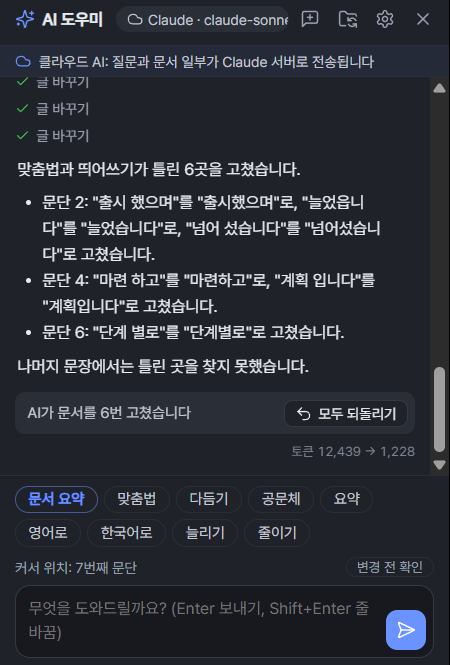
In 0.2.0 we rebuilt almost everything, from the engine to the interface. Type "Fix the spelling" in the chat panel on the right and the AI reads the document and fixes it directly,
and a document with a 50,000-cell table now opens in 94 s → 3.8 s.
✦AI Assistant☁ Claude · 🖥 Ollama
Fix the spelling
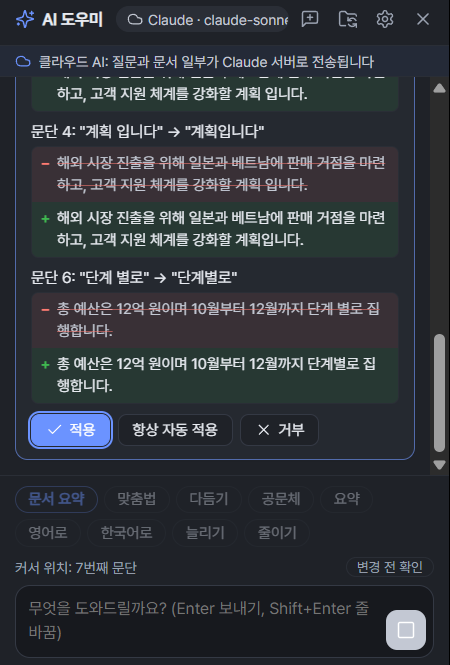
Paragraph 4: "sys tem." → "system."
− We plan to strengthen our customer support sys tem..
+ We plan to strengthen our customer support system.
Free · No ads✦ Claude · ChatGPT · Gemini · OllamaInstaller · PortableHancom-style ribbon · Document tabsWindows 10 / 11
3.8s
Open a 50,000-cell table
Previously 94 s
4.1s
Open a 314-page report
Previously 16.6 s
0.4s
App launch
New tab: 0.1 s
6
AI options to choose from
2 local · 4 cloud
$0
Price
No ads, no account
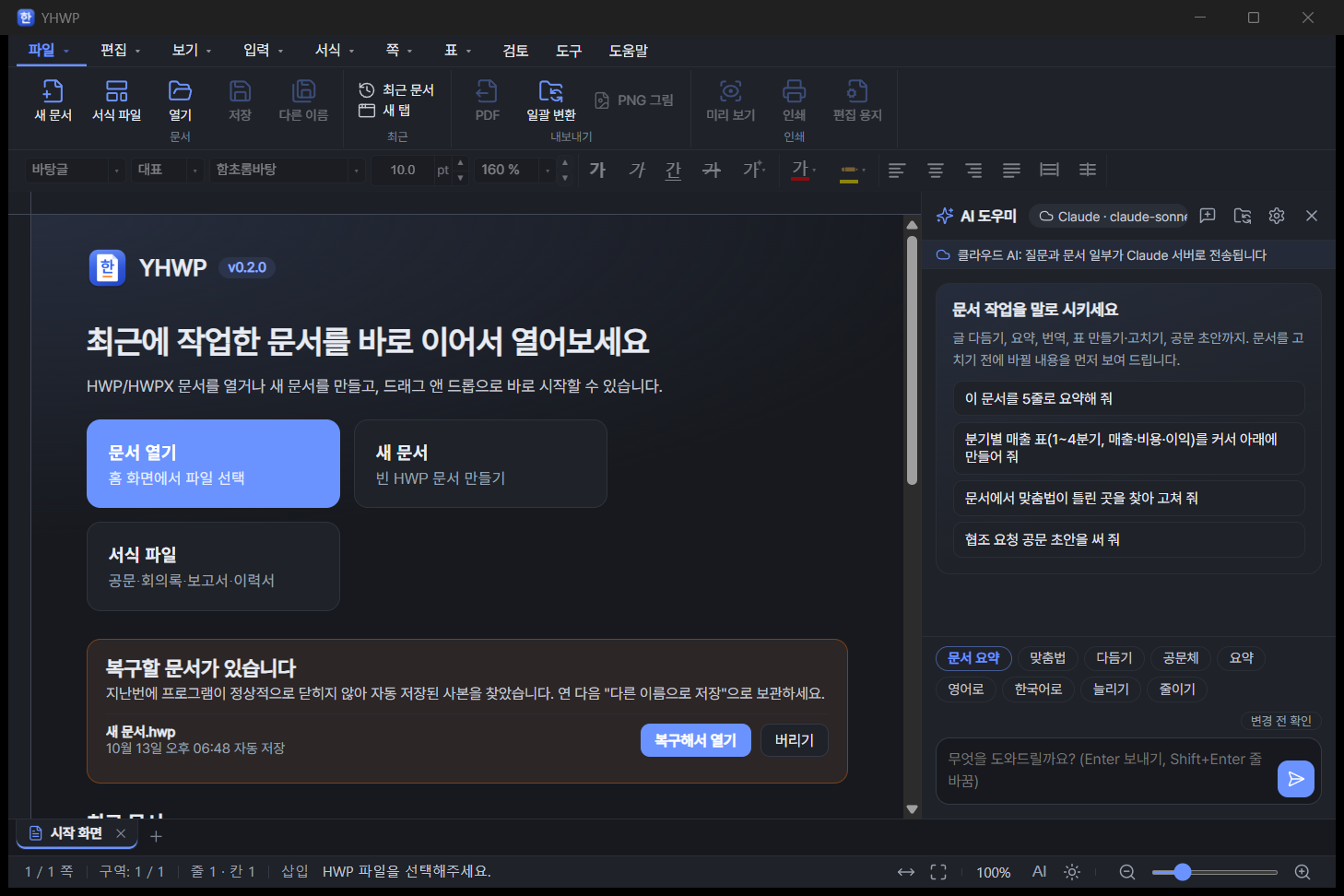
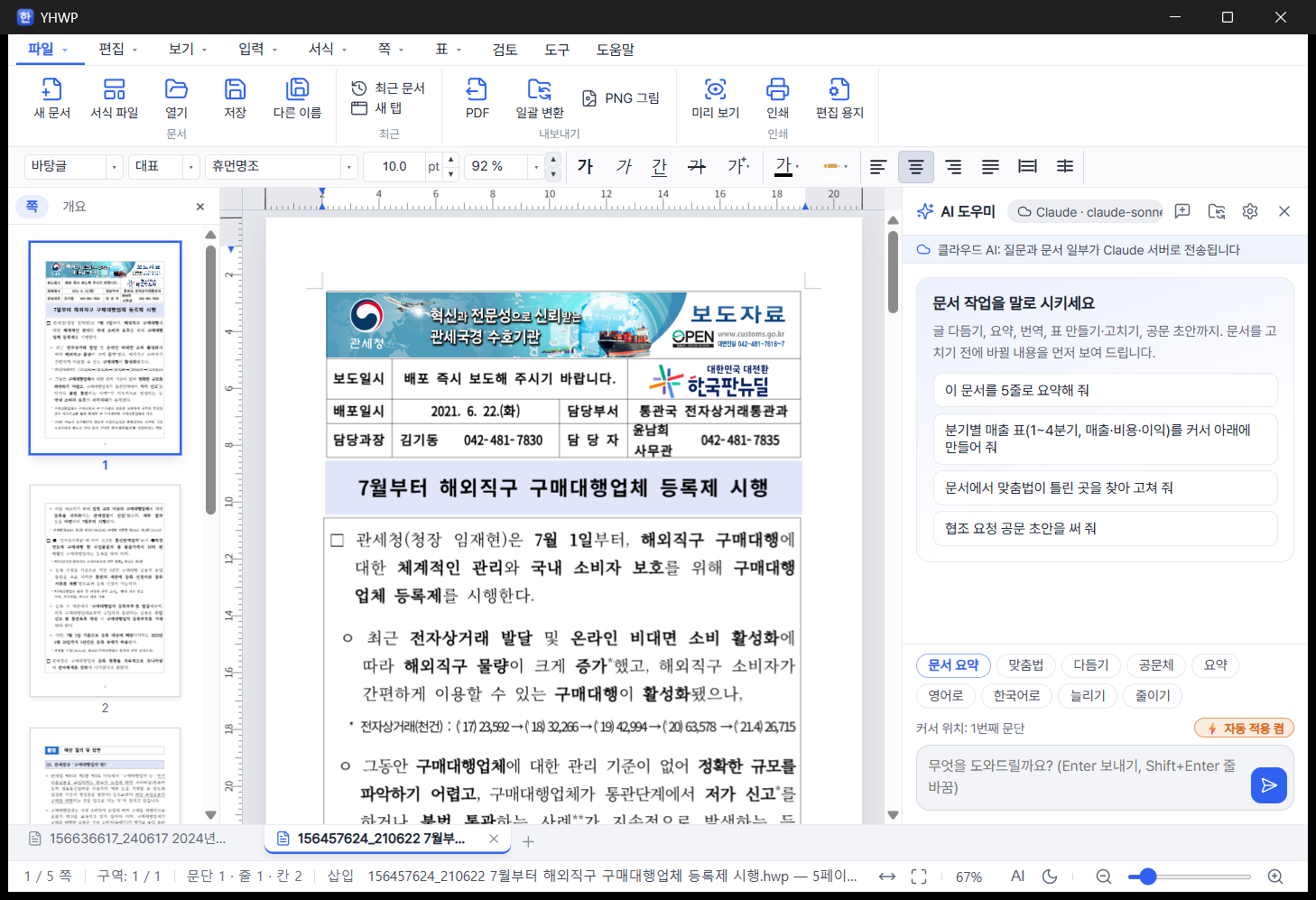
Start screen — pick a recent document preview, a new document or a template right away, and recover documents that closed unexpectedly. The AI Assistant is on the right.
NEW 0.2.0A major update, rebuilt almost from scratch2026-10-13
✦ AI Assistant
Just tell it what you want — it fixes spelling, builds tables, writes summaries and even drafts official letters directly in your document.
📁 Folder batch AI
Summarize or check dozens of documents in a folder at once and save the results as a single report.
🗂️ Document tabs
Document tabs above the status bar, just like Hancom. Switch between documents in one window.
🎀 Ribbon menu · New themes
Hancom-style ribbon toolbox, line icons, light/dark modes, 4 skins and 6 accent colors.
⚡ New engine
rhwp 0.8.7 plus improved large-table layout opens big documents several to dozens of times faster.
If you used an older version, just install the new installer over it. If the desktop still shows the old icon, that is the Windows icon cache; it changes after a reboot.
From 0.2.0, YHWP is Windows-only. We stopped shipping the macOS version because we could not fully test it on a real Mac — we don't want to release software we haven't verified. This version comes only as an installer, MSI and portable version for Windows 10/11 64-bit, and there is no Linux version this time either. On Mac or Linux, please use the web viewer (hwp.youngsam.net), which opens in your browser with no installation.
01 · HWP EDITOR
A free HWP editor that works without Hancom Office
It's not just a viewer for HWP files you receive — it's an editor that lets you edit and save them and convert them to PDF. The ribbon menu, document tabs, status bar and even shortcuts like F7 (Page Setup) match Hancom Hangul, so Hancom Hangul users feel at home right away.
Feature
Typical free HWP viewer
YHWP 0.2.0
Open HWP · HWPX
Yes
✓Both HWP 5.x and HWPX
Edit · Save
Mostly view-only
✓Save as HWP · HWPX
Export PDF · images
Via the print function
✓Direct PDF · PNG per page (200dpi)
AI document assistant
None
✓Spelling · tables · summaries · official letter drafts
Whole-folder processing
None
✓Batch AI summaries · batch PDF/HWPX/HWP conversion
Multiple documents
Multiple windows
✓Document tabs + detach to a new window
Carry on a USB drive
Mostly not possible
✓Portable version available
※ "Typical free HWP viewer" describes the usual case for view-only programs and varies by product.
02 · AI ASSISTANT
AI Assistant — tell it what to do and your document gets fixed
Ctrl+Shift+J or [Tools › AI Assistant], or the AI button in the status bar below opens it. (In Hancom, Ctrl+J is Page Break, so we picked a key that doesn't conflict.) The AI reads the document and first shows the original text (red) and the changed text (green); nothing goes into the document until you click "Apply".
1Ask
"Find and fix the spelling and spacing errors in the document"
2AI reads and finds
Reads the whole document and finds what to fix, paragraph by paragraph
3Before/after comparison
Shows red (before) and green (after) and asks you to confirm
4Apply · Undo
"Apply" to commit; if you don't like it, "Undo all" or Ctrl+Z
① Review changes — shows 6 fixes side by side before and after, such as a wrong space before a verb ending and an obsolete spelling (about 6 s with Claude).② Results — summarizes what was fixed, and a single "Undo all" restores the original.③ Live responses — text streams in instantly, and messages like "Thinking…" and "Preparing to insert paragraph…" show what it is doing right now.
Select text and click — done. With no selection, it applies to the paragraph at the cursor.
📝
Official letter drafts
Say something like "Draft an official letter requesting cooperation" and it writes it in the standard Korean official draft format.
🔁
Find & replace across the document
Change character and paragraph formatting and even fill in form fields — just by asking.
⚡
Always auto-apply
If confirming every time is tedious, turn it on. Turn it off with "⚡ Auto-apply" above the input box; automatic fixes can also be undone with Ctrl+Z.
03 · TABLES & SUMMARY
Table creation and long-document summaries — with source page numbers
📊 Build a table with one sentence
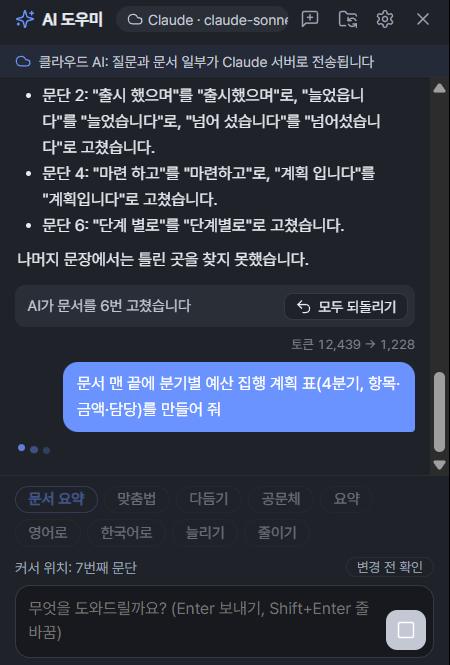
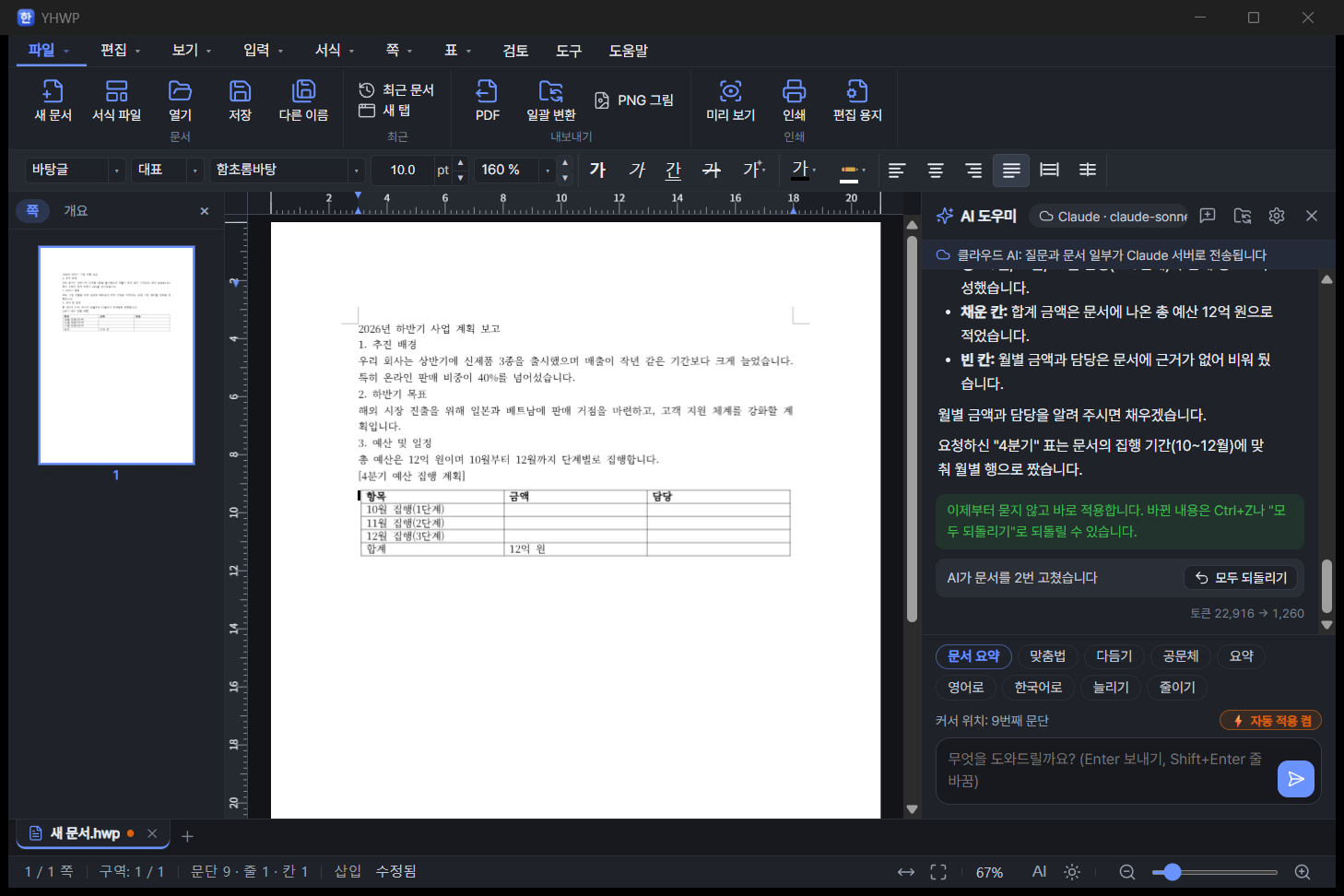
✓"Create a quarterly budget execution plan table at the end of the document" — it builds and inserts the table itself.
✓It fills in only what is in the document (a total budget of 1.2 billion won), and leaves cells with no source blank instead of making things up.
✓It can also edit tables: fill cells, add or delete rows and columns.
📚 Summarize and ask about hundreds of pages
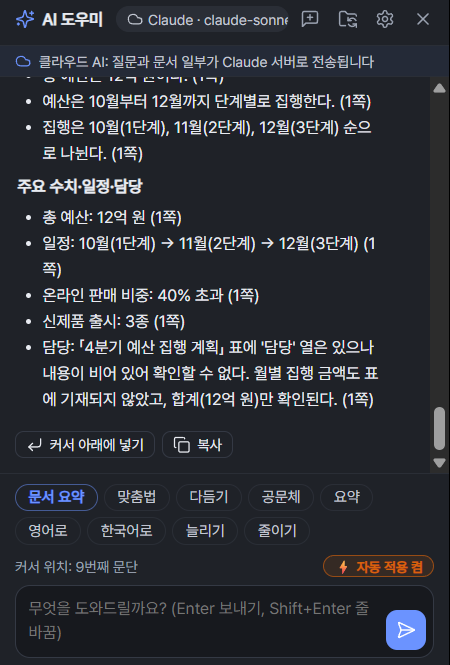
✓One "Summarize document" button summarizes the whole thing. Long documents are read in chunks and then combined.
✓Ask about the content and it answers with source page numbers like (p. 3), so you can check the original right away.
✓"Insert below cursor" puts the summary straight into the document.
Document summary — a one-line overview and key points with page numbers. Below: "Insert below cursor" · "Copy".
A budget table from a single sentence — with auto-apply on, it went straight into the document without asking. Cells with no source are left blank.
04 · CHOOSE YOUR AI
Choose your AI — from on-device AI to Claude, ChatGPT and Gemini
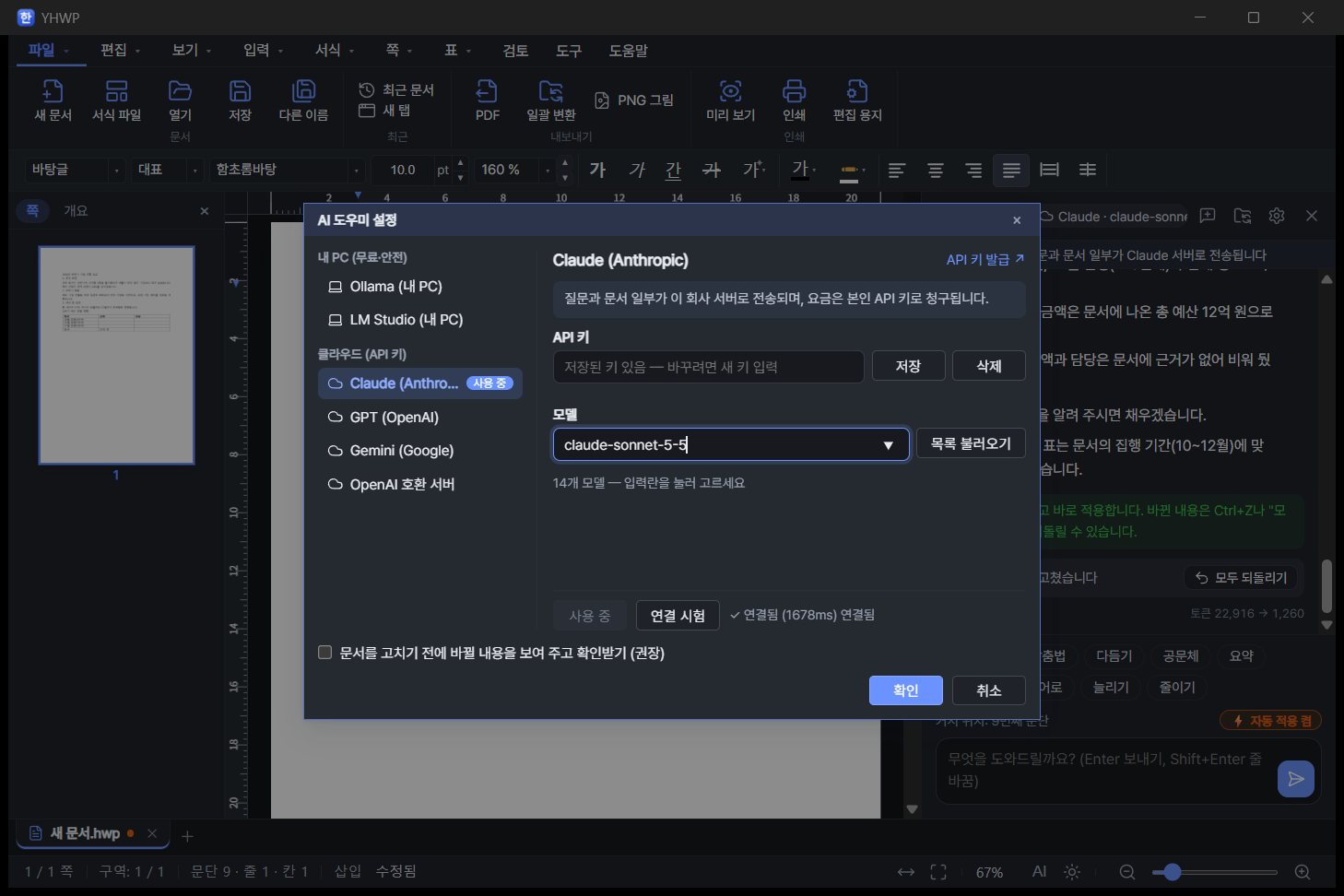
Documents that must not leave your organization, such as company or government files, can be handled by AI running on your own PC with no internet; when you need fast answers, use cloud AI. Above the chat panel, the AI in use is always labeled "My PC" or "Cloud".
🖥️ On-device (local) AI
Free · Documents never leave your PC
OllamaLM Studio
Recommended for security-sensitive documents. Depending on your PC's specs, a single answer may take tens of seconds.
☁️ Cloud AI
Your own API key · billed directly by each provider
ClaudeChatGPT (GPT)GeminiOpenAI-compatible server
For when you need fast, accurate answers. You are asked to consent to sending the document the first time.
AI settings window — pick an AI on the left, enter a key, then "Test connection". "Get a key" links and loading the model list work right there too.
🛡️ Built for peace of mind
✓Shows a before/after comparison and asks before changing anything (can be turned off in settings, or set to "Always auto-apply")
✓Revert AI changes with a single Ctrl+Z or "Undo all"
✓If an error occurs mid-edit, the document automatically returns to its original state
✓API keys are stored in Windows Credential Manager
✓Cloud AI asks for consent to send documents on first use, and "Cloud"/"My PC" is always shown above the chat panel
05 · BATCH AI
Folder batch AI — dozens of documents at once
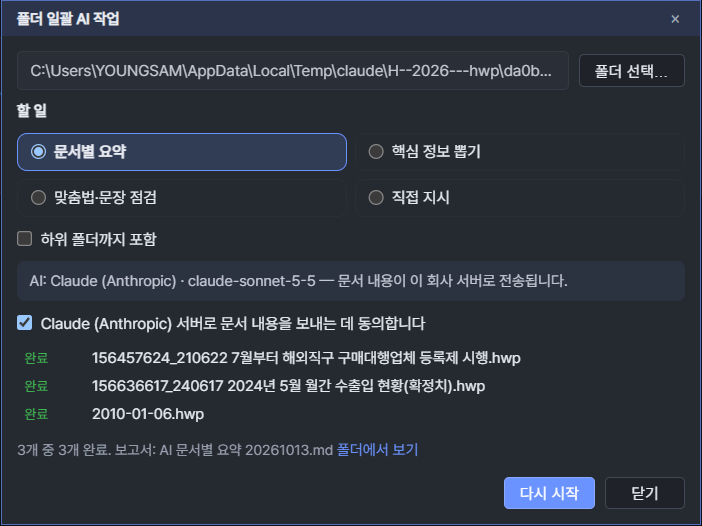
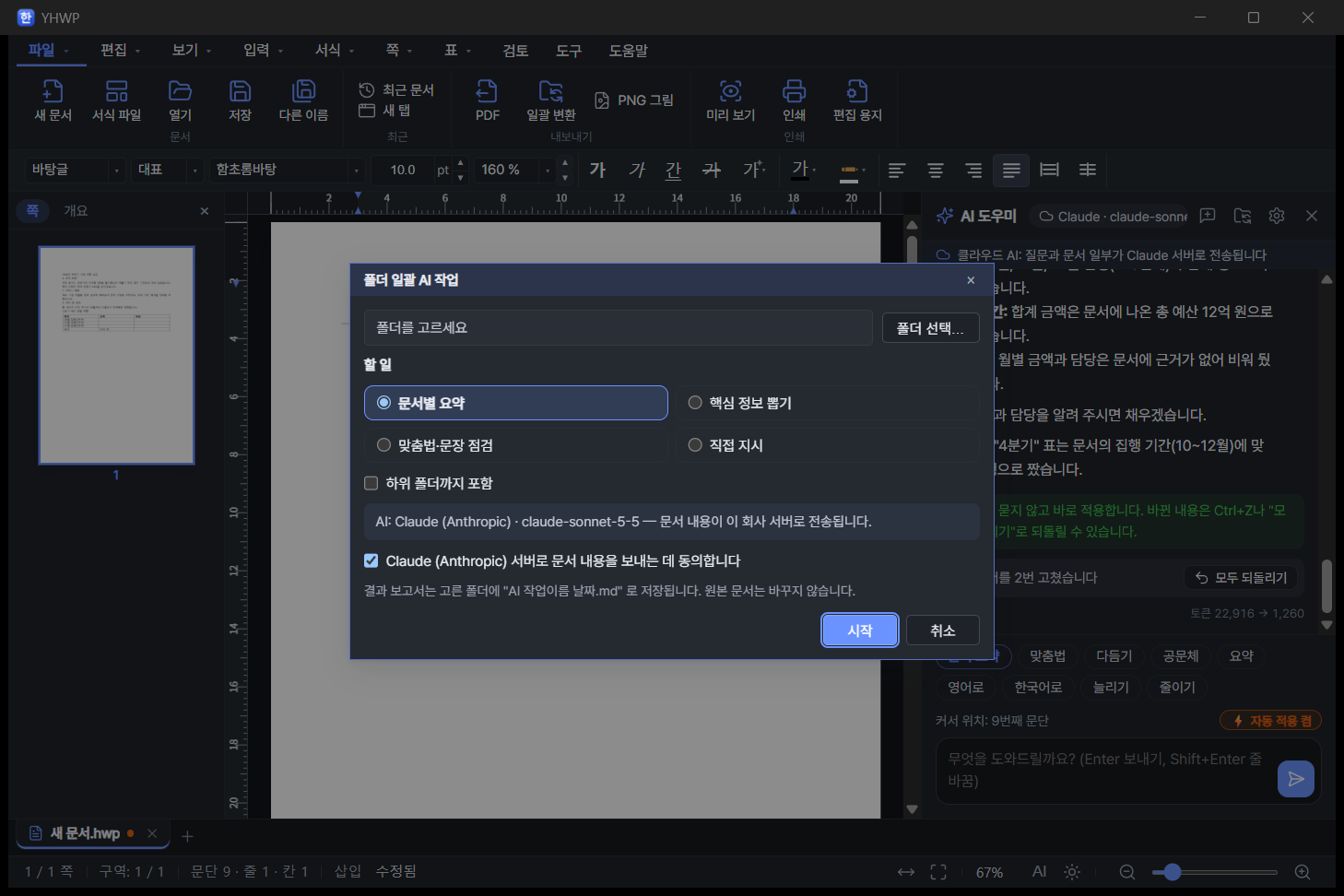
Choose a folder and a task, and the AI processes each document inside one by one and saves the results as a single report file (.md). Original documents are never touched, and if you stop midway, the results so far are saved.
Summary per documentExtract key info (dates · amounts · contacts)Spelling & sentence checkCustom instructionInclude subfolders
3 documents in about 30 s — summarized 3 documents, including press releases, with Claude. Open the report right away with "Show in folder".
●AI per-document summary 20261013.md
# AI Batch Report — Summary per Document
Result: 3 of 3 completed · AI: Claude
## Registration System for Overseas Direct-Purchase Agents Starts in July.hwp (5 pages)
One-line overview: The Korea Customs Service will launch a registration system for overseas direct-purchase agents on July 1, 2021; mail-order businesses whose purchase-agency goods totaled 1 billion won or more in the previous year must register.
- Who must register: total value of imported purchase-agency goods of 1 billion won or more in the previous year (pp. 2, 3)
- Grace period & penalties: grace period until June 30, 2022; failure to register is punishable by a fine of up to 20 million won (pp. 2, 4)
## Monthly Import/Export Status, May 2024 (Final).hwp (19 pages) …
Excerpt from an actual report — for each document, a one-line overview and key points with source page numbers.
Folder batch AI settings — choose a folder and a task; for cloud AI, confirm consent to send, then start.
06 · SPEED
Faster — big documents open dozens of times faster
We upgraded the document engine to the latest rhwp 0.8.7 and rewrote the large-table layout code ourselves. Shorter bars are faster (gray 0.1.x, blue 0.2.0).
Open a 50,000-cell table documentabout 24.7×
0.1.x94 s
0.2.03.8 s
Render a 50,000-cell table document in fullabout 4.3×
0.1.x60 s
0.2.014 s
Open a 314-page reportabout 4×
0.1.x16.6 s
0.2.04.1 s
Render a 314-page report in fullabout 10.6×
0.1.x51 s
0.2.04.8 s
🚀 App launch in about 0.4 s
The start screen appears as soon as you launch.
➕ New tab in about 0.1 s
Prepared in advance, so it opens the moment you click.
🔬 Identical output, down to the character
We compared before and after on 1,680 documents (over 20,000 pages) and confirmed the rendered output did not change.
07 · TABS & DESIGN
Document tabs and a new design — as familiar as Hancom
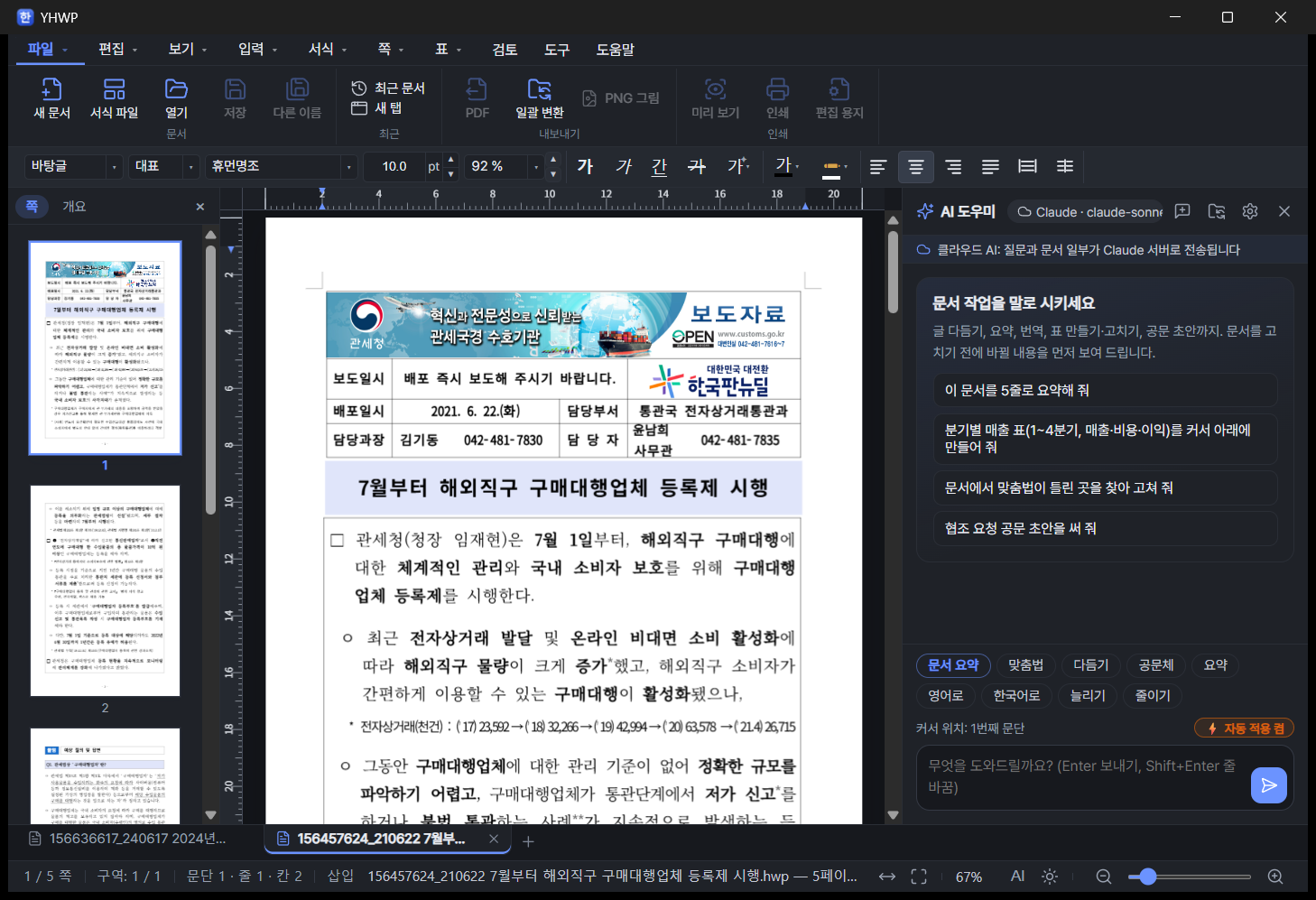
Document tabs (dark theme) — two documents open in tabs. Page thumbnails on the left, AI Assistant on the right.Same screen (light theme) — switch instantly with the sun/moon button in the status bar.
🗂️ Document tabs
✓Switch by clicking a tab or with Ctrl+Tab / Ctrl+Shift+Tab
✓New tab with the + button or Ctrl+T (about 0.1 s)
✓Close with the × button, middle-click or Ctrl+F4 (asks first for unsaved documents)
✓Right-click: close all other tabs, detach to a new window
✓Orange dot on tabs with unsaved documents
✓Open or drag and drop several files at once and each gets its own tab
✓Hidden tabs stop rendering, so even many tabs stay lightweight
🎨 Themes · Skins · Ribbon
YHWP Modern
Hancom Classic
Flat
Old School
6 accent colors· Light / Dark / System
✓Hancom-style ribbon toolbox — click a menu name and the toolbox switches to that menu's tools (the classic layout can be chosen in the View menu)
✓Unified line icons stay crisp on high-resolution screens
✓Left navigation pane: page thumbnails and outline
✓Status bar: page · section · paragraph · line · column position, Insert/Overwrite, zoom slider
※ Skin and accent color swatches are illustrations to aid understanding and may differ slightly from the actual colors.
08 · NEW FEATURES
New features
📄
Templates
Official letter (draft), meeting minutes, report and résumé — start a new document instantly.
💾
Autosave and recovery
Saves a copy every minute. If the app closes unexpectedly, recover your document from the start screen when you relaunch.
🔄
Folder batch conversion
Convert documents in a folder to PDF, HWPX or HWP all at once. Processes as many files in parallel as you have CPU cores, and skips broken files while listing them.
🖼️
PNG export
Saves each page as a 200dpi image file.
👀
Print preview
Check before printing in one-page, two-page or multi-page view.
⌨️
Command search · Ctrl+/
Type a feature name to run it immediately, even if you don't know which menu it's in.
PriceFree · No ads · No account (cloud AI fees are billed by each provider to your own API key)
"Windows protected your PC" dialog on first launch This notice appears because this is an independently developed program without a code-signing certificate. Click "More info" → "Run anyway" to continue. You can first verify that the file matches the original using the SHA-256 values below.
The AI Assistant connects nowhere until you turn it on and configure it yourself. With on-device AI (Ollama · LM Studio), documents never leave your PC; cloud AI sends them only to the provider you chose, after asking for consent on first use. The only other network use is checking for new versions (GitHub), and there are no ads and no usage tracking.
Built on MIT open source
YHWP is built by Youngsam.net on the open-source HWP engine rhwp (MIT) and HOP (MIT), adding the AI Assistant, folder batch tasks, document tabs, the ribbon UI and more. It bundles the Noto Sans KR font (SIL OFL) for PDF export.
It opens and saves documents mostly the same way Hancom Hangul does, but when converting HWPX to HWP, some documents may end up with a different page count due to differences in the two formats' layout rules. For important documents, keep a separate copy of the original while you work.
13 · FAQ
Frequently asked questions
Can I open and edit HWP files without Hancom Office?
Yes. YHWP is a free editor that opens and edits HWP 5.x and HWPX documents, saves them as HWP or HWPX and exports to PDF — no Hancom Office required. The ribbon menu, document tabs, status bar and shortcuts like F7 (Page Setup) match Hancom Hangul, so you can start right away.
Is YHWP really free?
Yes, the program is free and has no ads. To use cloud AI (Claude, ChatGPT, Gemini) you need an API key from each provider, and you pay that provider for what you use. On-device AI (Ollama, LM Studio) is completely free.
Can AI fix the spelling in HWP documents?
Yes. Type "Find and fix the spelling and spacing errors" into the AI Assistant (Ctrl+Shift+J) and it reads the whole document, finds what to fix, and first shows the text before (red) and after (green) the change. Changes go into the document only when you click "Apply", and "Undo all" or Ctrl+Z restores the original.
Which AI models can I use?
You can choose Ollama or LM Studio running on your PC, or Claude, ChatGPT (GPT), Gemini or an OpenAI-compatible server in the cloud. API keys are stored in Windows Credential Manager, and the settings window offers key sign-up links, model list loading and connection testing right there.
Does using AI send my documents outside my PC?
Not with on-device AI. Cloud AI asks for consent to send documents on first use and always shows whether it is "Cloud" or "My PC" above the chat panel. The AI Assistant connects nowhere until you turn it on and configure it yourself.
Can I summarize multiple HWP files or convert them to PDF at once?
Yes. Folder batch AI summarizes, extracts key info from or spell-checks each document in a folder and saves everything as one report (.md), without touching the originals. Folder batch conversion converts documents to PDF, HWPX or HWP all at once, processing as many in parallel as you have CPU cores.
Do large HWP documents open quickly?
In 0.2.0, a document with a 50,000-cell table went from 94 s to 3.8 s, and a 314-page report from 16.6 s to 4.1 s. App launch takes about 0.4 s and a new tab about 0.1 s. We confirmed on 1,680 documents that the rendering output is identical before and after the improvements.
What's the difference between the installer and the portable version?
The features are the same. The installer (.exe, or .msi for companies) lets you open HWP files by double-click and adds a Start menu entry; the portable version (.zip) only needs to be unzipped and YHWP.exe run, so you can carry it on USB, but it doesn't set up file associations. Both versions store settings in your PC's user folder.
Can I use it on Mac or Linux?
From 0.2.0, only Windows 10/11 64-bit is provided. We stopped shipping the macOS version because we couldn't fully test it on a real Mac. On Mac or Linux, please use the web viewer hwp.youngsam.net, which opens in your browser with no installation.
I was using an older version — how do I update?
Download the new installer and install it over the old one. If the desktop still shows the old icon after installing, that's the Windows icon cache; it changes after a reboot.
Do documents look exactly the same as in Hancom Hangul?
Most documents open and save identically. However, when converting HWPX to HWP, some documents may end up with a different page count due to differences in the two formats' layout rules.
Isn't on-device AI like Ollama slow?
Depending on your PC's specs, a single answer may take tens of seconds. We recommend cloud AI if you need fast answers and on-device AI if security matters.
I see a "Windows protected your PC" dialog — is it safe?
This notice appears because it's an independently developed program without a code-signing certificate. Click "More info" → "Run anyway". You can first check that the downloaded file's hash matches the SHA-256 values on this page.
Where can I report problems or request features?
Youngsam.net Community: please leave your feedback there, and we'll reflect it in the next version. The source code is public on GitHub (openr03/YHWP).
Hancom Office and Hangul (HWP) are trademarks of Hancom Inc.; Claude is a trademark of Anthropic, ChatGPT of OpenAI, and Gemini of Google. YHWP is not affiliated with these companies.
Version history(2)
v0.2.0Latest
October 13, 2026
AI 도우미(Ctrl+Shift+J) — 맞춤법·띄어쓰기 교정(전후 비교 후 적용), 표 만들기·고치기, 긴 문서 요약(근거 쪽 번호), 공문 초안, 빠른 실행 버튼, Claude·ChatGPT·Gemini·OpenAI 호환·Ollama·LM Studio 선택. 폴더 일괄 AI 작업(요약·핵심 정보·맞춤법 점검 → 보고서 .md). 문서 탭, 한컴식 리본 도구 상자, 선 아이콘, 테마·스킨 4종·강조색 6종. 엔진 rhwp 0.8.7(셀 5만 개 표 열기 94초→3.8초, 314쪽 보고서 16.6초→4.1초). 서식 파일, 1분 자동 저장·복구, 폴더 일괄 변환(PDF·HWPX·HWP), PNG 내보내기, 미리 보기, 명령 찾기(Ctrl+/). F7 편집 용지 창 문제 등 버그 수정. 0.2.0부터 Windows 전용(macOS판 배포 중지).