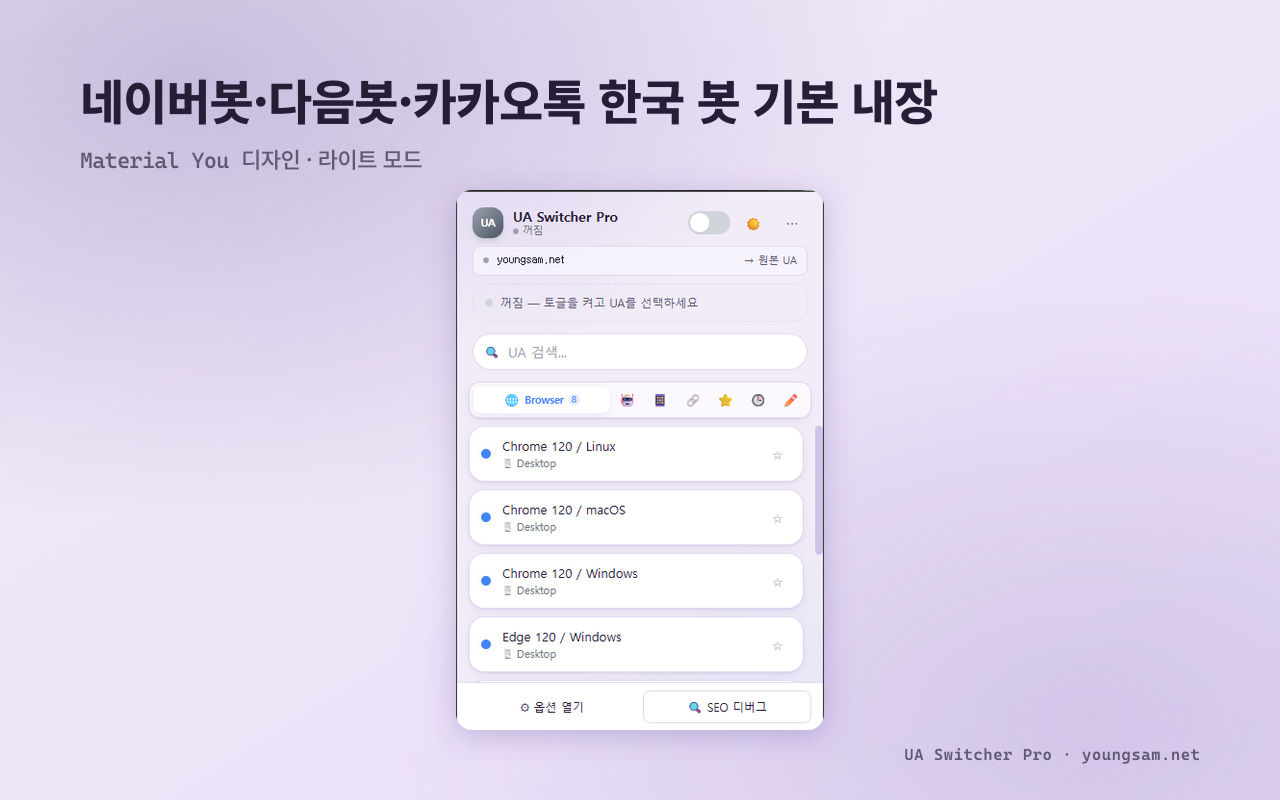
Why UA Switcher Pro
Existing User Agent Switcher extensions have two big weaknesses.
No Korean bots - No extension ships with the UA strings for Korean search and social bots like Naver Yeti, Daum Daumoa, or the KakaoTalk link-preview bot (KakaoTalk-Scrap), so SEO marketers have had to memorize and paste in each UA string by hand.
Spoof only the header and JavaScript gives you away - Most extensions only spoof the HTTP request header. Unless
navigator.userAgentand the Sec-CH-UA Client Hints are spoofed consistently too, you're exposed instantly on the client side.
UA Switcher Pro is a free Chrome extension that tackles both problems head-on. It ships with four Korean bots - Naver Yeti, Daum, KakaoTalk-Scrap and ZumBot - as built-in presets, and reproduces a bot's environment faithfully with triple, consistent spoofing of the header, Client Hints, and the navigator.userAgent JavaScript object.
Key differences
Feature / Ordinary User Agent Switcher / UA Switcher ProKorean bot presets None Naver Yeti · Daumoa · KakaoTalk-Scrap · ZumBot built inSpoofing depth HTTP header only Header + Sec-CH-UA + navigator.userAgent (all three)SEO cloaking diagnosis None Fetches the same URL with a normal UA and a bot UA, then diffs the response HTMLKakaoTalk link preview None Auto-extracts og: tags + simulates KakaoTalk / Facebook cardsPer-domain auto-apply Partial Wildcards · regex · whitelist · per-tab UA
Main features
1. 30+ built-in presets: Korean, global and social bots
From Naver Yeti (Desktop/Mobile), Daum Daumoa, ZumBot and KakaoTalk-Scrap to Googlebot Desktop/Smartphone/Image, Bingbot, DuckDuckBot, YandexBot, Baiduspider, Applebot, AhrefsBot, SemrushBot, facebookexternalhit, Twitterbot, LinkedInBot, Slackbot, Discordbot, Telegrambot and WhatsApp. No more memorizing UA strings.
2. Triple consistent spoofing: header + Client Hints + JS object
Instead of just changing the User-Agent header, it spoofs Client Hints like Sec-CH-UA, Sec-CH-UA-Mobile and Sec-CH-UA-Platform, plus the page context's navigator.userAgent JS object, all at once. This blocks the common pattern where a bot-detection script catches you out with "the header and JS don't match."
3. SEO cloaking diagnosis
It fetches the same URL simultaneously with a regular user UA and a bot UA (e.g. Googlebot) and compares the response HTML. This visually detects SEO cloaking - a site showing different content to bots. Handy for checking your site before a Google penalty.
4. KakaoTalk / Facebook link-preview simulation
It auto-extracts the current page's og:title, og:description and og:image and reproduces the KakaoTalk and Facebook link-preview cards right on screen. Marketers can check the preview without actually sending the link to a KakaoTalk chat.
5. Per-domain auto-apply rules
When you visit a specific domain, your chosen UA is applied automatically. It supports wildcards (*.naver.com), regex, whitelists, and per-tab UAs. Use your default UA most of the time and view just one site with a mobile UA - just add a single rule.
6. Shortcuts and hotkeys
Ctrl+Shift+U- Toggle the UA changeCtrl+Shift+B- Re-apply the last bot UA usedFavorite hotkeys
1-9- Switch to a favorited UA in one second
7. Temporary disable (auto-resume)
Temporarily disable for 5, 15 or 60 minutes. After the set time it turns back on automatically. It prevents the classic "I just needed to turn it off for a second, forgot to turn it back on, and it stayed off all day" mishap.
8. Sync across PCs with Chrome Sync
Sync your favorite UAs, domain rules and general settings via your Chrome account, so your office PC and home PC automatically share the same setup. JSON import/export is also supported separately, so backups and migration are effortless.
9. Auto-refresh on UA change
When you change the UA, the current tab refreshes automatically so the new UA takes effect immediately. You can turn this off in the options.
10. Material You + iOS design, multilingual UI
An interface that cherry-picks the best of Material You (Android 14 design) and iOS design. Automatic light/dark mode switching. It supports a 7-language UI: Korean · English · 日本語 · 中文(Simplified) · Español · Français · Deutsch.
11. Usage stats and search highlighting
It automatically tallies and shows your Top 5 most-used UAs. When you search the UA list by keyword, matching parts are highlighted.
12. Drag to reorder favorites
Add the bots you use often to favorites and reorder them by dragging. Hotkeys 1, 2, 3 ... map automatically from the top down.
Who it's for
SEO marketers - See exactly how Naver's Yeti bot, Daum's Daumoa bot and Googlebot view your site. Head off penalties with SEO cloaking diagnosis.
Web developers - Quickly test mobile and bot UAs. With per-domain rules, your dev site always looks desktop and staging looks mobile, applied automatically.
Marketers & content creators - Check KakaoTalk and Facebook link-preview cards without leaving the page. Slash your og: tag debugging time.
QA engineers - Cross-browser, cross-device compatibility testing. Switch quickly to a different UA for every regression test.
Built-in bot UA list
Korean search & messenger bots (4 not found in other extensions)
Naver Yeti (Desktop / Mobile) - Naver search bot
Daum Daumoa - Daum search bot
ZumBot - Zum search bot
KakaoTalk-Scrap - KakaoTalk link-preview bot
Global search bots
Googlebot (Desktop / Smartphone / Image)
Bingbot
DuckDuckBot
YandexBot
Baiduspider
Applebot
AhrefsBot
SemrushBot
Social preview bots
facebookexternalhit (Facebook link preview)
Twitterbot (Twitter/X cards)
LinkedInBot
Slackbot
Discordbot
Telegrambot
WhatsApp
How to install
Click the download button above to go to the Chrome Web Store.
Click the "Add to Chrome" button.
Pin the installed extension's icon to your browser toolbar.
Click the icon and pick the bot UA you want - it applies instantly.
Frequently asked questions (FAQ)
Does applying the Naver bot UA change my Naver search results?
No, Naver's search results themselves don't change. UA Switcher Pro is a tool that makes the server of the site you visit recognize you as a bot. Turn on the Naver bot UA and visit your own site, and you can see exactly what HTML your site serves to Naver Yeti. It's a core feature for SEO cloaking diagnosis.
How do I debug the KakaoTalk link-preview card?
Apply UA Switcher Pro's KakaoTalk-Scrap preset and you visit the page with the KakaoTalk bot's UA. At the same time, it takes the og:title, og:description and og:image extracted from the page and simulates them on screen in the shape of a KakaoTalk card. You can check the preview result without actually sending the link to a KakaoTalk chat.
How is this extension different from an ordinary User-Agent Switcher?
Two things are the core difference. First, Korean search and messenger bot UAs like Naver Yeti, Daum Daumoa, KakaoTalk-Scrap and ZumBot are built in. Other extensions make you type the UA string yourself. Second, it doesn't just change the HTTP header - it consistently spoofs the Sec-CH-UA Client Hints and the navigator.userAgent JS object too, to bypass bot detection.
Is it safe? Is any personal data collected?
There is no external telemetry or analytics whatsoever. Settings and favorites are stored only in the browser's chrome.storage, and if you turn on Chrome Sync in the options, they sync only through your Google account. No user data is ever sent to an external server. The source is released under the MIT license.
Is it completely free?
Yes. 100% free, no ads, no sign-up. You can use every feature without restriction. There's no in-app purchase, pro version, or feature lock.
How do I get updates?
Per Chrome Web Store policy, new versions update automatically when released. No separate installation is needed. When a new bot preset or feature is added, it's announced with a changelog badge at the top of the extension popup.
Technical specifications
Program name UA Switcher Pro - user-agent switcher Chrome extensionType Chrome extension (Manifest V3)Category Developer tools · SEO toolsDeveloper Kim Youngsam / Youngsam.net (youngsam.net)Platforms Chromium-based browsers such as Chrome · Edge · Whale · BraveUI languages Korean · English · 日本語 · 中文(Simplified) · Español · Français · DeutschBuilt-in bot presets 30+ (4 Korean · 8 global search bots · 7 social preview bots, and more)Personal data collection NoneExternal server communication NoneAds NonePrice 100% freeLicense MIT
Developer
Kim Youngsam · Youngsam.net
One of a series of free, ad-free, practical programs run by Youngsam.net. Other programs include DS Sender (Synology NAS download automation) and NexDesk (P2P remote desktop). Please send feedback and bug reports to the community.