Overview
You try to copy some text and get "Right-click is disabled", or drag an image and get "Dragging is disabled"... frustrating, right?
ClickFree is a Chrome extension that unlocks right-click blocking, copy protection, drag blocking and text-selection blocking on web pages in a single click.
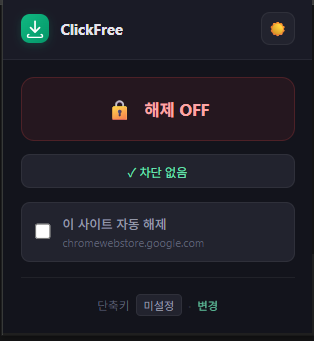
Click the extension icon once and every restriction on the current page is lifted. Click again to restore it. That's all there is to it.
No ads. No data collection. No background activity.
Key features
1. Unlock right-click blocking
- Removes the page's
oncontextmenuevent handlers - The right-click menu shows up normally
- Restores built-in browser actions like "Save as" and "View source"
2. Unlock copy protection
- Removes
oncopy,oncutandonpasteevent handlers - Neutralizes the CSS
user-select: nonestyle - Ctrl+C and Ctrl+V work as expected
3. Unlock drag blocking
- Removes
ondragstartandonselectstartevent handlers - Image dragging and text dragging work normally
4. Unlock text-selection blocking
- Removes CSS
user-select: noneand-webkit-user-select: none - You can select text by dragging with the mouse
5. Toggle-based
- Click the icon → restrictions lifted (icon shows active)
- Click again → back to the original state
- Works per page - other tabs are unaffected
Who it's for
- People who need to copy web-page text for study or research
- Designers saving images to build reference collections
- Developers who need to inspect a page's source
- Anyone quoting text from blogs or news articles
- Anyone who wants to use built-in browser features like Translate or Search from the right-click menu
How to use
- Install ClickFree from the Chrome Web Store
- Click the extension icon on a restricted web page
- When the icon switches to its active state, the restrictions are lifted
- Use right-click, copy and drag freely
- Click again to restore the original state
Reloading the page automatically returns it to its original state.
Other tabs are not affected.
How it differs from similar extensions
| Extension | Ads | Permissions | Background activity | Toggle |
|---|---|---|---|---|
| Typical right-click unlocker | Yes | Access to all sites | Yes | X |
| ClickFree | None | activeTab only | None | O |
Because it uses only the activeTab permission, it works only on the current tab where you clicked the icon. It does not monitor every site in the background.
Specifications
| Name | ClickFree |
| Type | Chrome extension |
| Category | Productivity tool |
| Developer | youngsam.net |
| Platform | Chromium-based browsers such as Chrome, Edge, Whale and Brave |
| Permissions | activeTab, scripting |
| Data collection | None |
| Background activity | None |
| Network communication | None |
| Ads | None |
| License | Freeware |