Overview
Existing Synology extensions basically cram a NAS client into your browser. DS Sender takes a different approach.
The idea: become a pipe that naturally streams every download your browser sees straight to your NAS. With no separate client UI, when you click a magnet link as you normally would, that click itself registers a task in your NAS Download Station.
It sends magnet, torrent, and direct links to your Synology NAS in a single click.
Key Features
1. Send to NAS in one click
Click a magnet link on any page → sent straight to your NAS
No extra dialog, no extra clicks
A natural flow, no different from clicking an ordinary link
2. Intercept .torrent files (optional)
Intercepts .torrent files downloaded through the browser and uploads them directly to your NAS
Even sites that need login cookies, like private trackers, pass authentication because the file is fetched in the page's first-party context
If DSM rejects the multipart upload, it automatically falls back to magnet conversion
3. Drag & drop
Drag a .torrent file you've already downloaded onto the extension popup to upload it to your NAS instantly
A workaround for sites with expiring tokens or session-bound downloads
4. Smart routing
Auto-sort into folders by domain or filename regex patterns
Automatically organize into category folders such as movies, TV, music, and anime
Off by default, so your NAS's default folder is used as-is; only those who want it can enable and customize it in the options
5. Automatic session renewal
Automatically manages DSM's trusted-device token (
did)Enter your OTP once at the start, and from then on it re-logs in automatically without OTP
Keeps working seamlessly even after the browser or NAS reboots
6. Offline queue
Queues tasks when the NAS is temporarily unreachable
Retries automatically once it recovers
Never miss a download even during a VPN drop or brief maintenance
7. Multiple NAS profiles
Register both your home and remote NAS and switch between them quickly
Change the active NAS with one click in the top-right of the popup
8. Settings backup & restore
Export/import your profiles, routing rules, and general settings as JSON
Handy when moving to a new PC or as a safeguard against mishaps
9. Four languages + dark/light theme
Korean · English · 日本語 · 中文 (Simplified)
Switch instantly in settings
Dark/light theme, auto or forced
Installation
Install DS Sender from the Chrome Web Store
After installing, click the extension icon → ⚙ Settings → register a NAS profile.
Field / Example / Note — NAS address: http://192.168.0.10:5000 or https://nas.example.com (two profiles for LAN/remote recommended); Account / Password: your DSM account (Download Station permission required); OTP (2FA): 6 digits (only if 2-step verification is on, once at first).
Enter the NAS address, account, and password → click "Test Connection" → it saves and activates automatically. Done.
How It Works
Magnet links on any site
Click a magnet link on the page → the extension intercepts it and sends it to your NAS → the result shows as a toast in the bottom-right.
Downloading .torrent files
Turn on the ".torrent interception" toggle in the options → browser downloads are intercepted and auto-uploaded to your NAS. Even private-tracker cookie auth is handled automatically.
Magnet from the clipboard
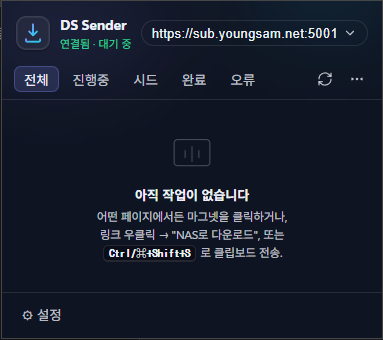
Copy a magnet URL from anywhere → Ctrl/⌘ + Shift + S → straight to your NAS.
Drag & drop a .torrent onto the popup
Drag a .torrent file you've already downloaded onto the extension popup to upload it to your NAS.
Monitoring tasks
Click the extension icon → check progress, speed, and ETA in real time. Pause, resume, and delete right there too.
Security & Privacy
No external telemetry or analytics whatsoever. It communicates only with your NAS.
Passwords are stored in the browser's
chrome.storage.local(in plaintext, a limitation of the extension storage model). Using it on a shared PC is not recommended.For a NAS with a self-signed HTTPS certificate, you just need to add the certificate as trusted in your browser once.
Host permissions are used only for the NAS domain you enter and for magnet/torrent interception.
Technical Notes
Manifest V3 · no build step (runs from source as-is)
Vanilla JS, zero external dependencies
Custom i18n engine (
chrome.i18nis locked to the OS locale, unsuitable for settings-based language switching)Page-context fetch via
chrome.scripting/ content-script messages to work around SameSite cookie issuesBuilt-in bencode parser — .torrent → magnet conversion fallback (when DSM rejects file uploads)
Technical Specifications
Name: DS Sender — Synology Download Station · Type: Chrome extension · Category: download tool · Developer: Youngsam.net · Platforms: Chrome · Edge · Whale · Brave and other Chromium-based browsers · Target NAS: Synology DSM 6.x / 7.x (Download Station must be enabled) · Permissions: storage, contextMenus, notifications, alarms, scripting, activeTab, downloads, clipboardRead, host_permissions(http/https) · Data collection: none · External server communication: none (communicates only with the NAS you register) · Ads: none · Languages: Korean · English · 日本語 · 中文(Simplified) · License: freeware
Download
Version 1.0.0
Chrome / Edge / other Chromium-based browsers