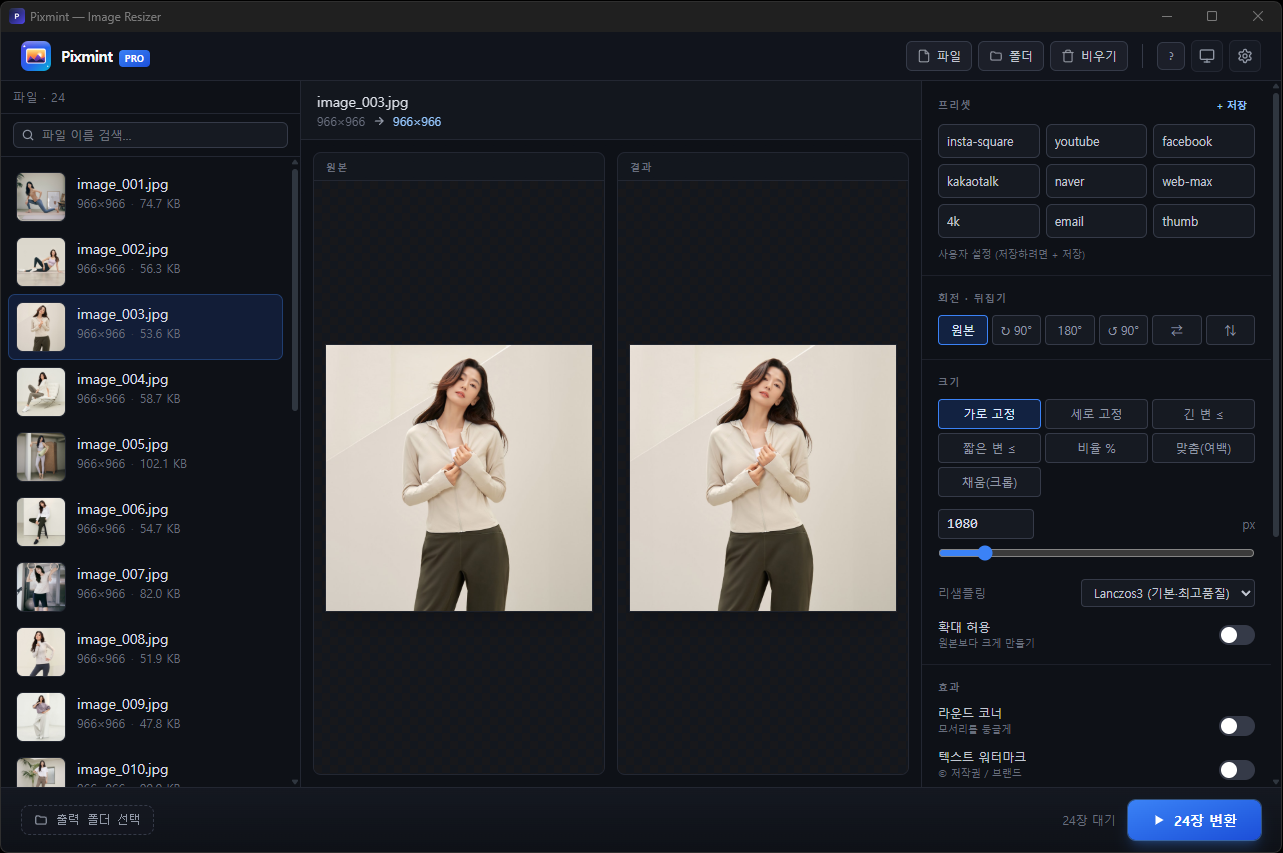
About Pixmint
If you run a blog, an online store, or social accounts, you've probably thought "I really need to shrink this..." every time you upload a photo. Firing up Photoshop feels like overkill, online converters make you upload one image at a time, filenames get garbled, and the ads are distracting.
Pixmint is a Windows image resizer built to solve exactly those headaches. Drag and drop, click your options, convert. That's all there is to it.
In one line
A Windows image resizer built with a Rust engine and a modern UI. Drag and drop, click your options, convert. That's it.
Fast - Rust SIMD engine. Around 0.1 seconds for a batch of 5
Easy - 9 presets (Instagram, YouTube, Naver, KakaoTalk and more) in one click
Light - 3.5MB installer, 13MB standalone. Zero ads
Safe - Never touches your originals. Results go to new files
Key features
1. Nine versatile resize modes
Fixed width / height (set one side and the ratio follows automatically)
Long edge ≤ / short edge ≤
Ratio % (50%, 80%, etc.)
Fit (add padding) / Fill (crop)
Exact (forced size)
Rotate / flip (90°/180°/270°, horizontal, vertical)
2. Nine built-in presets - one click
Preset / SizeInstagram 1080×1080 (square)YouTube 1280×720 (thumbnail)Facebook 1200×630 (OG image)KakaoTalk 640×640 (profile)Naver Blog 900px wide (auto, under 500KB)Web-optimized long edge 1920px4K limit long edge 3840pxEmail 1200px wide (auto, under 1MB)Thumbnail 400×400 + rounded corners
You can save your own settings with the + Save button, and apply them next time with a single click.
3. Automatic target-file-size compression (the key feature for bloggers)
Tell it "get this under 500KB" and it automatically adjusts quality with a binary search to hit the target within ±5%. Perfect for the upload limits on Naver Blog, cafés, and all kinds of forums.
4. Watermarks (text + image)
Text watermark: 9 positions, adjustable size/opacity, with a black shadow so it stays crisp on any background
Diagonal repeating watermark: repeats across the whole image at a 30° angle for copyright protection
Image watermark: composite a logo PNG
5. Color adjustment - brightness, contrast, saturation, sharpening
Quick tone tweaks without opening Photoshop. A live preview lets you see the result instantly.
6. Batch conversion + filename policy
Drag a whole folder and process hundreds at once. For filenames:
Same as original (overwrite possible)
Suffix (
photo_resized.jpg)Sequential number (
vacation_001.jpg,vacation_002.jpg...)
When a file of the same name already exists, you can choose: overwrite / skip / auto-add a number.
7. Use it from cmd / PowerShell too
cd C:\photos
img                              # auto-convert the current folder → ./resized/
img -w 1080                      # width 1080
img --preset insta               # Instagram
img --target-kb 500              # auto compress (under 500KB)
img -w 1080 --round 24 --wm "© 2026 MyShop"
In Settings → CLI integration you can register a name of your own besides img (e.g. resize, picshrink). Adding it to the Windows right-click menu is also one click.
Tech stack
Core engine - Rust
fast_image_resizev5 - SIMD (AVX2/SSE4) accelerated resizingimagev0.25 - JPEG/PNG/WebP/BMP/GIF/TIFF encodersimageproc- graphics primitives (rounded corners, watermark compositing)oxipng+ zopfli - lossless PNG optimizationrayon- multi-threaded parallel processingab_glyph- watermark text rendering with an embedded font
GUI - Tauri 2 + a modern web stack
Tauri 2.11 - 1/10 the size of Electron, using the native WebView2
React 19 - the latest stable release
Tailwind CSS v4 - JIT compilation + CSS-variable-based theming
TypeScript 5.7 - strict mode
Vite 6 - fast builds
Build configuration
LTO thin, opt-level 3, codegen-units 1, strip symbols. Result: a 13MB standalone executable and a 3.5MB installer.
Why this combination
Tauri, not Electron: same React + Tailwind, but the output is 1/10 the size and uses far less memory
Rust instead of Python or C#: native speed + safe memory management + a single .exe to distribute. The CLI and GUI share the same engine
Performance (measured, batch of 5)
Task / TimeSimple resize (width 1080) 0.123sRounded corners + watermark 0.176sColor adjustment + resize 0.125sAuto-compress to 100KB target 0.217s
Bulk example: 1,000 images take about 25 seconds. That's 5-10× faster than a typical Windows GUI resizer.
Design & languages
Light/dark/system auto-detect themes. The tone stays consistent from the header to the options panel to the footer. 12 languages supported (Korean, English, Japanese, Simplified Chinese, Traditional Chinese, Spanish, French, German, Portuguese, Russian, Vietnamese, Thai).
Download
File / Size / UsePixmint_1.1.0_x64-setup.exe 3.5 MB General users (NSIS installer, recommended)img-gui.exe 13 MB Standalone (no installation)Pixmint_1.1.0_x64_en-US.msi 5.2 MB Enterprise / group-policy deployment
A Windows SmartScreen warning may appear (a code-signing certificate isn't applied yet). Click "More info → Run" and it installs normally. A certificate is planned for version 1.2.
System requirements: Windows 10/11, WebView2 (already installed on most PCs).
New in v1.1.0
Right-click context menu - quick per-file actions (convert / open result / copy path / remove)
Completion sound - know when a conversion finishes even while you're doing something else
Auto-open folder when done - the result folder shows the moment conversion finishes
Delete user presets - don't like one? hover → ✕
Modern scrollbar - separate light/dark tones, darkening on hover
Several stability bugs fixed (white screen, console flicker, etc.)
Developer's note
It started as just a "batch converter for store photos," but as I built it I got ambitious and ended up adding watermarks, color adjustment, CLI integration, and multilingual support.
What I cared about most was "enough speed and quality to skip Photoshop." Thanks to Rust + SIMD it's genuinely fast, and because the same engine powers both the CLI and the GUI, automation stays clean too.
The commercial license is free. Send feedback and I'll roll it into 1.2.
Recommended for
People running blogs or stores who need to shrink photo file sizes
People who make Instagram and YouTube thumbnails quickly
Photographers and designers who need copyright watermarks
Developers who want to use the CLI for batch processing and automation
People who find opening Photoshop a hassle but need Photoshop-level quality
Frequently asked questions (FAQ)
Q. Is it really free? Can I use it commercially?
Yes, it's completely free and can be used commercially. Use it for a blog, a store, company materials - anywhere. No payment, subscription, or time limit. No ads, and no telemetry (usage data collection).
Q. Can it match this quality without Photoshop?
For everyday tasks like resizing, compression, and watermarking, you'll be hard-pressed to tell the difference from Photoshop. Pixmint uses the Lanczos3 algorithm and SIMD acceleration to produce results nearly identical to Photoshop's "Bicubic Sharper" option. That said, complex edits like free transform, layers, and filters still need Photoshop.
Q. How many images can it handle at once?
By measurement, even 1,000 images process in about 25 seconds. It loads just one photo at a time to convert and releases it immediately, so tens of thousands are no problem. Drag a whole folder to process it all at once.
Q. Are my original photos damaged?
Your originals are never touched. Results are always saved as a new file, going into a resized subfolder by default. Even if you enable overwrite in the original folder, it proceeds only after you explicitly confirm.
Q. Can it meet Naver Blog's photo size limit (10MB)?
Yes, use the "automatic target-file-size compression" feature. Specify something like "under 500KB" and it adjusts quality automatically to hit the target within ±5%. The Naver Blog preset defaults to 900px wide + auto-compression under 500KB.
Q. How do I get the right size for Instagram, YouTube, or KakaoTalk?
One click on a preset. Instagram is 1080×1080 (square), YouTube thumbnails are 1280×720, KakaoTalk profiles are 640×640 - nine platform-recommended sizes are built in.
Q. Can I use it from a USB drive without installing?
Yes, grab the standalone version (img-gui.exe, 13MB). Put it on a USB or external drive and double-click to run it on another computer right away. It barely touches the registry.
Q. Does it work on Mac or Linux?
Version 1.1.0 is currently Windows 10/11 only. Mac and Linux builds are technically possible since it's based on Tauri 2, and we plan to support them in a future version if there's enough demand.
Q. Can I use it instead of PhotoScape or ALSee?
For core features like resizing, batch conversion, watermarking, and auto-compression, Pixmint is faster (Rust SIMD), has no ads, and enables automation via CLI integration. That said, some PhotoScape features like collage and GIF animation aren't in Pixmint.
Q. How do I adjust the watermark's position and size?
Choose from 9 positions (top-left, top-center, top-right, middle-left, center, middle-right, bottom-left, bottom-center, bottom-right) and adjust size, opacity, and color. For copyright protection there's also a diagonal repeating watermark that repeats across the whole image at a 30° angle.
Q. Does it support JPG, PNG, WebP, BMP, GIF, and TIFF?
Yes, all six formats are supported for both input and output. You can batch-convert JPG input to WebP, or losslessly optimize PNG with oxipng + zopfli - cross-format conversion is fully supported.
Q. SmartScreen warns me - is it safe?
It's safe. Because a code-signing certificate isn't applied yet, Windows treats it as a program it hasn't seen before and shows a warning. Click "More info → Run" and it installs normally. A certificate is planned for version 1.2.