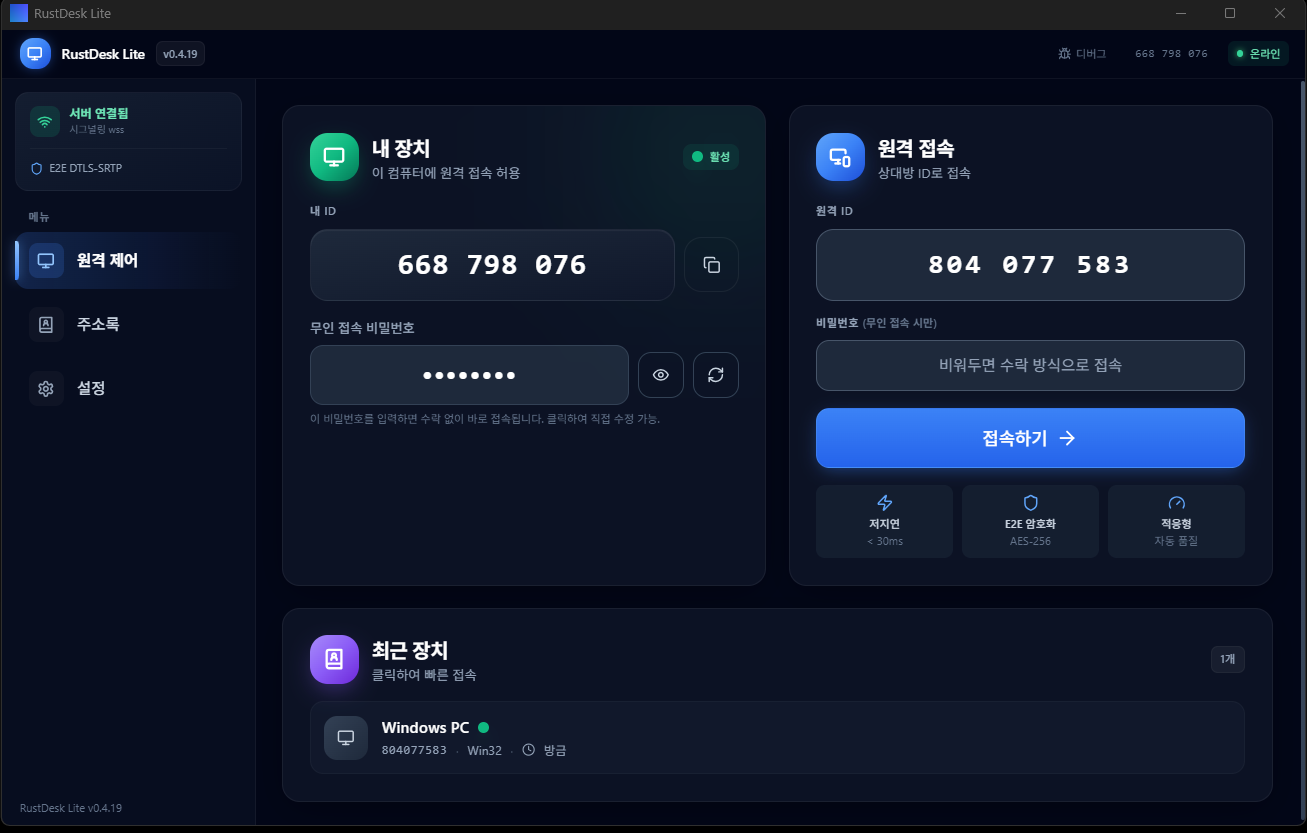
In one line
NexDesk is a 5MB ultra-light P2P remote desktop. Zero ads, zero tracking, no sign-up, no subscription. A genuinely free alternative to TeamViewer and AnyDesk, with support for both Windows and Linux.
- Installs in a minute, ready to use instantly
- Direct P2P connection — no cloud relay
- AES-256 end-to-end encryption
- A native app rewritten in Rust + Tauri + webrtc-rs
- 100% free, ad-free, free for life
Why we built it
TeamViewer and AnyDesk are powerful, but they increasingly push even personal users toward paid plans, and existing open-source remote tools were Electron-based and weighed in at a heavy 77MB. "Just the features you need, kept light" — we rewrote the whole thing from scratch for that single idea.
6 core features
1. Direct P2P connection
NAT traversal connects the two devices directly. The signaling server is used only to exchange connection info; the actual video, keyboard and mouse data never passes through a server. Zero cloud cost, minimal latency.
2. E2E AES-256 + X25519
Every session is end-to-end encrypted. Even the server operator (us) cannot see your screen. Key exchange uses X25519, and the payload is encrypted with AES-256-GCM.
3. Unattended access
Set a password in advance and you can connect without the other side approving. Handy for managing your own PC remotely or working on your office computer from home.
4. Multi-monitor
Switch monitors freely mid-session. Keep the original resolution while adjusting image quality. It shines in dual/triple-monitor setups.
5. Adaptive bitrate and FPS
It measures network conditions and adjusts bitrate and FPS automatically. Runs smoothly even on LTE.
6. Chat, file transfer and clipboard sync
Text chat during a session, two-way file transfer, and automatic clipboard sync. Get all your collaboration done on one screen — no separate messenger or file-sharing tool needed.
Compared to commercial alternatives
| Item | TeamViewer | AnyDesk | RustDesk (upstream) | NexDesk |
|---|---|---|---|---|
| Price | $34.90+/mo | $14.90+/mo | Free | Free |
| Commercial use | Paid | Paid | Allowed | No restrictions |
| Install size | ~50 MB | ~5 MB | ~77 MB | ~5 MB |
| Account sign-up | Required | Required | Optional | Not needed |
| Ads / tracking | Paid ads | Some | None | None |
| Direct P2P | Partial | Supported | Supported | Supported |
| Open source | No | No | Yes | Yes |
Tech stack
- Rust — memory safety + native performance
- Tauri — a desktop framework 1/13 the size of Electron
- webrtc-rs — pure-Rust WebRTC implementation, handles P2P connections
- openh264 — open-source H.264 encoder for screen streaming
- scrap / rdev — screen capture and input hooking
3 distribution formats — which one should you get?
| Type | Best for | Details |
|---|---|---|
| Setup.exe (NSIS) | Everyday users — first time | Standard Windows install wizard. Automatically creates Start Menu and desktop shortcuts. Auto-update channel enabled. Most people should get this one. |
| Portable.zip | IT folks with a USB stick, PCs without admin rights | No install — just unzip and run. Doesn't touch the registry. When you're done, just delete the folder. Handy for internet cafes, kiosks and the like. |
| MSI | Enterprise IT admins | Mass-deploy to many PCs via Group Policy (GPO). Compatible with SCCM, Intune and PDQ Deploy. Supports silent install. |
System requirements
- Windows — Windows 10 1809 or later (64-bit)
- Linux — x86_64, glibc 2.31 or later (Ubuntu 20.04+, Debian 11+, Fedora 33+)
- macOS — coming soon (late 2026)
- 256 MB RAM or more, 30 MB disk
- Internet connection (a signaling server is needed to establish the P2P connection)
Install and start — 3 steps
- Download: pick the file above that matches your environment
- Run: after installing (or unzipping), launch NexDesk
- Connect: share the 9-digit ID and password shown on screen with the other person → they enter it on their side → connected instantly
Setting up unattended access
Settings → Security → Set a permanent password
  ↓
Now you can connect from anywhere using your PC's ID + password
Security model
- Every session does key exchange via X25519, then encrypts with AES-256-GCM
- Passwords are hashed with PBKDF2 (SHA-256, 100,000 iterations)
- All four channels — screen, mouse, keyboard and clipboard — are encrypted
- Zero cloud data storage — the signaling server only brokers connection negotiation
- Logs are stored only on your PC. Nothing is sent externally
- Open source, so you can verify supply-chain trust
FAQ
I knew this as "RustDesk Lite" before. Is it the same program?
Yes, it's the same program under a new name. We rebranded it to NexDesk in May 2026. Existing users will receive the NexDesk build via auto-update, and settings and account info are preserved.
How is it different from upstream RustDesk?
Upstream provides a full stack — mobile, web client, management console and more — but reaches 77MB. NexDesk focuses on the core desktop P2P features to shrink down to 5MB, with a UI simplified for a Korean environment. Protocol compatibility is intact, so it can still communicate with upstream clients.
Can I use it at work?
Yes, there are no commercial-use restrictions. The license is GPLv3-compatible open source, and Youngsam.net does not separately commercialize it. IT admins can also mass-deploy the MSI version.
Does it work behind firewalls and NAT?
In most home and office NAT environments, hole punching happens automatically. On some symmetric NATs (certain carriers) it falls back to TURN relay via the signaling server. No port forwarding required.
When will Mac be supported?
It's in development, targeting Q4 2026. Built on ScreenCaptureKit, it will support macOS 13 Ventura and later.
Are updates automatic?
If you install via Setup.exe, it checks for a new version in the background once a week and shows a notification. Portable and MSI are updated manually.
Any plans for ads or a paid tier?
None. Youngsam.net covers its operating costs through other projects, and NexDesk will permanently maintain a non-commercial, ad-free policy.
Roadmap
- Q3 2026 — mobile client (Android first)
- Q4 2026 — official macOS support
- Q1 2027 — multi-user session management (small-team environments)
- Q2 2027 — screen recording and session log options
References and contact
- Official site: nexdesk.youngsam.net
- Old site (RustDesk Lite): auto-redirected
- Bug reports and feature requests: GitHub Issues
- Contact: info@youngsam.net