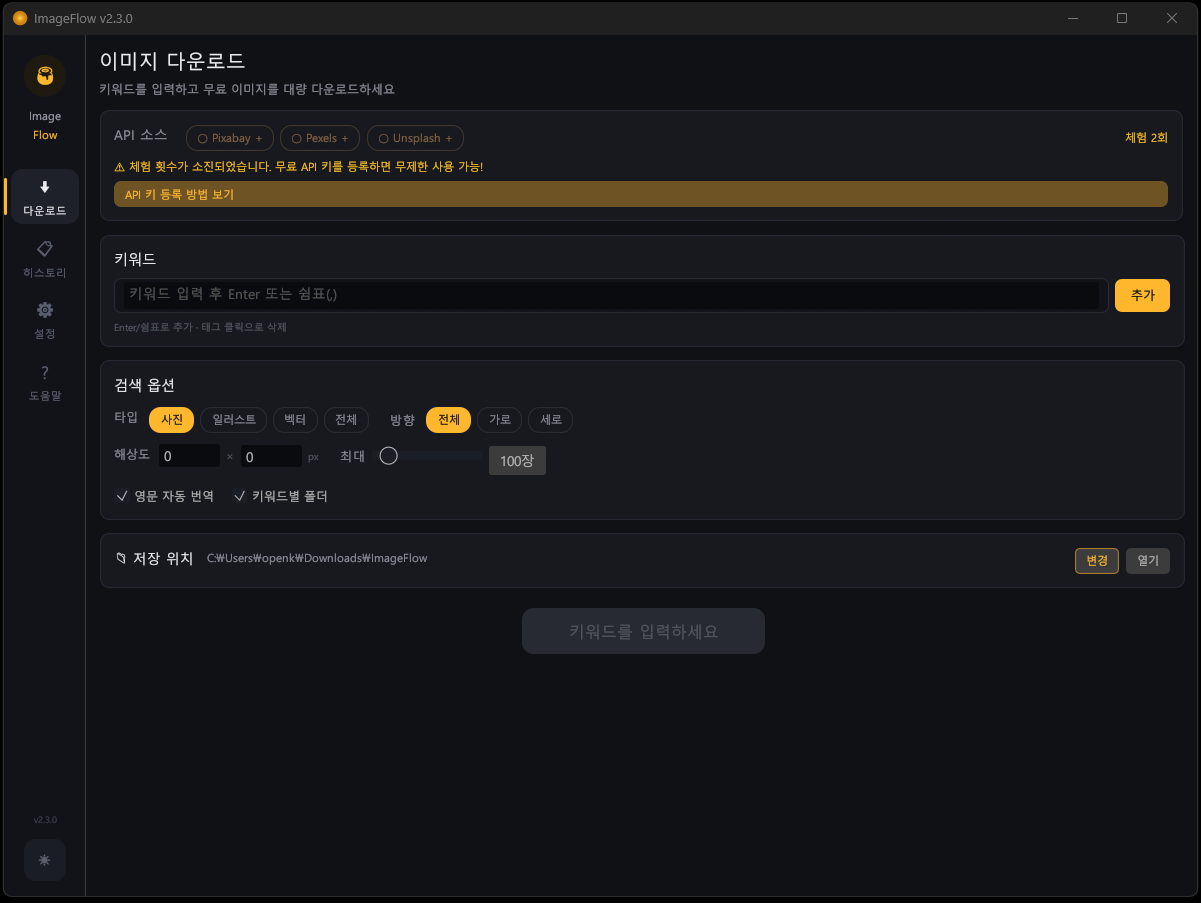
One keyword, three sites searched at once — automatic bulk download
Still saving free images one by one from Google for your blog, slide decks, or design work? With ImageFlow, you just type a keyword and it searches Pixabay, Pexels, and Unsplash simultaneously, automatically filters out duplicates, and downloads the full-resolution originals in one go.
6.3MB · no install · no ads · no login. Built with Rust + egui, it's about 10x lighter than Electron apps and delivers near-native speed. Two built-in trial API calls are included; after that, grab your own free keys (about 3 minutes) for unlimited lifetime use.
Key Features
Search all three APIs at once & bulk download
- Pixabay (100/min) · Pexels (200/hour) · Unsplash (50/hour)
- Search all three sites with a single keyword, with live per-API progress
- Up to 1,000 images per keyword; queue multiple keywords in sequence
- Pause / resume / stop, and open the folder automatically when done
Two-layer duplicate prevention
- Layer 1: duplicate check by image ID (per API)
- Layer 2: content-based blocking via SHA256 hash
- History is stored permanently, so repeating the same keyword never re-downloads duplicates
Korean-to-English auto-translated search
- Enter a Korean keyword and it auto-converts to English and searches both at once — 2x+ more results
- 50+ built-in translation dictionary (animals, nature, food, interiors, and more)
Fine-grained search options
- Image type (photo, illustration, vector), orientation (horizontal, vertical), and minimum resolution
- Auto-creates a subfolder per keyword; freely set your save path
Live progress dashboard
- Found / downloaded / duplicate / failed stat cards plus an overall progress bar
- Live speed, time remaining, size, and per-API progress
- Dark/light theme, live log (500-line buffer)
How to Use
- Run ImageFlow.exe (double-click to launch right away)
- Enter keywords (add with Enter or a comma)
- Choose API sources — the first two runs work instantly with the built-in trial keys
- Click "Start Download" — auto search → deduplicate → download
Shortcuts: Enter/, add keyword · click a tag to remove · Esc stop immediately
Getting Free API Keys
All three APIs are free and issued instantly once you sign up. You can use just one, but registering all three triples your search volume.
- Pixabay: sign up at pixabay.com → copy your API Key from pixabay.com/api/docs/
- Pexels: sign up at pexels.com → click Generate API Key at pexels.com/api/new/
- Unsplash: unsplash.com/developers → New Application → copy the Access Key (not the Secret Key)
Run ImageFlow → Settings (⚙) → API Keys tab → paste your key → Save
How It Compares
| Tool | Price | Method | Limits |
|---|---|---|---|
| Google Image Search | Free | Manual save | Copyright issues |
| Stock sites | $29–199/mo | Paid subscription | Watermarks |
| Browser extensions | Free | Semi-automatic | One site only |
| ImageFlow | Free | Fully automatic, bulk | Unlimited |
Technical Specifications
| Platform | Windows 10/11 (64-bit) |
| Language / GUI | Rust · egui 0.31 + eframe 0.31 |
| Executable size | 6.3 MB (portable, no install) |
| Memory usage | About 15–30 MB |
| CPU usage | 0% idle · 1–3% while downloading |
| Data collection | None |
| License | Freeware (free for personal and business use) |
Build optimizations: opt-level="z" · LTO · strip · codegen-units=1 (minimum size)
Config Files
config.json— API keys, download settings, theme (in the same folder as the executable)history.json— download history + duplicate-prevention data- Full removal: delete the files above / Reset: deleting config.json regenerates defaults
* The trial API keys are used only inside the binary and are never saved to config.json.
Who It's For
- Anyone who needs free images in bulk for blogs, YouTube thumbnails, or slide decks
- People who want to quickly collect royalty-free images without copyright worries
- Anyone who needs photos for website/app mockups, teaching materials, or marketing content