본문 바로가기
Windows

Deckora

Free AI presentation app (open & save PPTX, Korean-first)

A free presentation app for making Korean slide decks quickly and correctly. Open and save PPTX files as they are, and use the AI subscription you already have (Claude, ChatGPT, Gemini), an API key, or a local AI (Ollama, LM Studio) to draft a deck from a topic, then polish, summarize and translate it. Word-unit line breaking, Korean font matching, vertical text, Korean dates and numbering. Free for Windows.

v1.0.0·Published November 1, 2026·Downloads 19
#데코라#Deckora#프레젠테이션 프로그램#무료 프레젠테이션#AI 프레젠테이션#발표자료 만들기#AI 발표자료#PPTX 편집기#pptx 열기#슬라이드 만들기#한국어 프레젠테이션#AI발표자료#PPTX#무료프로그램+8
Downloadv1.0.019
Deckora
Deckora v1.0.0
AI PRESENTATION · WINDOWS 10 / 11
A free AI presentation app
give it a topic, get a slide deck

Make the Korean decks you build every day — proposals, reports, lectures — quickly and correctly. Enter a topic and the AI drafts your slides; then polish, summarize, translate and write speaker notes right inside the app, using the AI subscription you already pay for or a local model on your own PC.

FreePPTXKorean-firstAI assistantMade by Youngsam.net
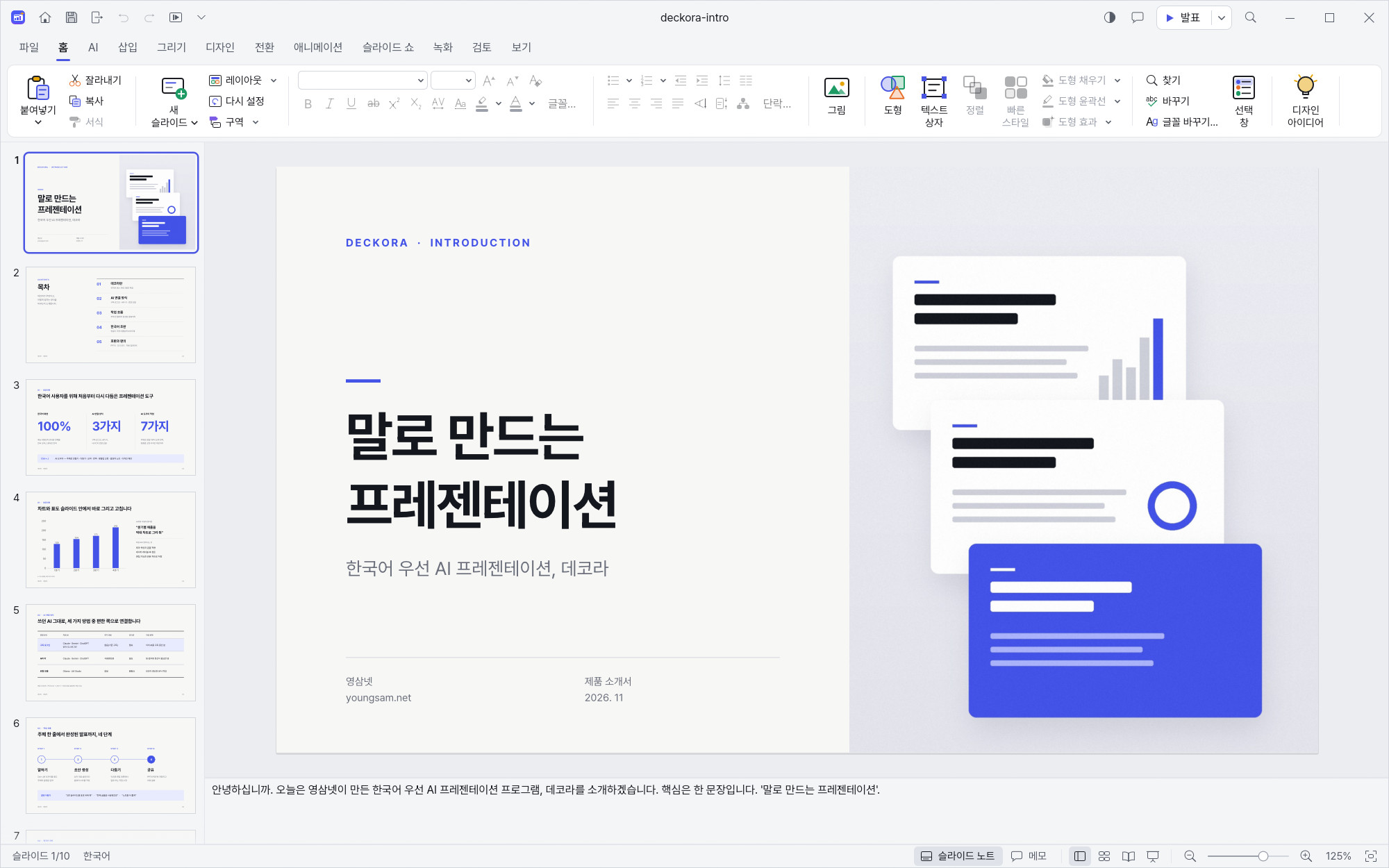
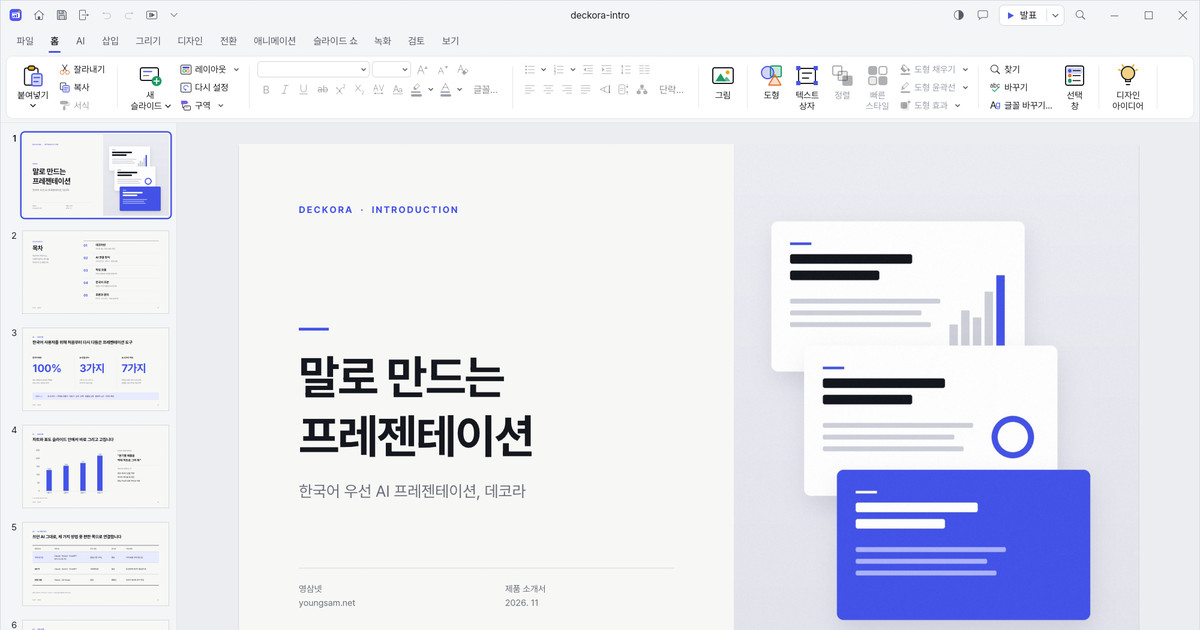
Main editor — the Deckora intro deck open, with the slide list and Korean editing view
$0
No extra cost
320+
Editing commands
3ways
To connect AI
subscription · API key · local
53.6 MB
Installer size
01 · KOREAN

A presentation app that puts Korean first

🇰🇷
Fully Korean interface (English also supported), clean Pretendard UI font
↩️
Word-unit (eojeol) line breaking
Korean words never split awkwardly at line ends
🔤
Automatic Korean font matching
including Nanum Gothic and Nanum Myeongjo
🀄
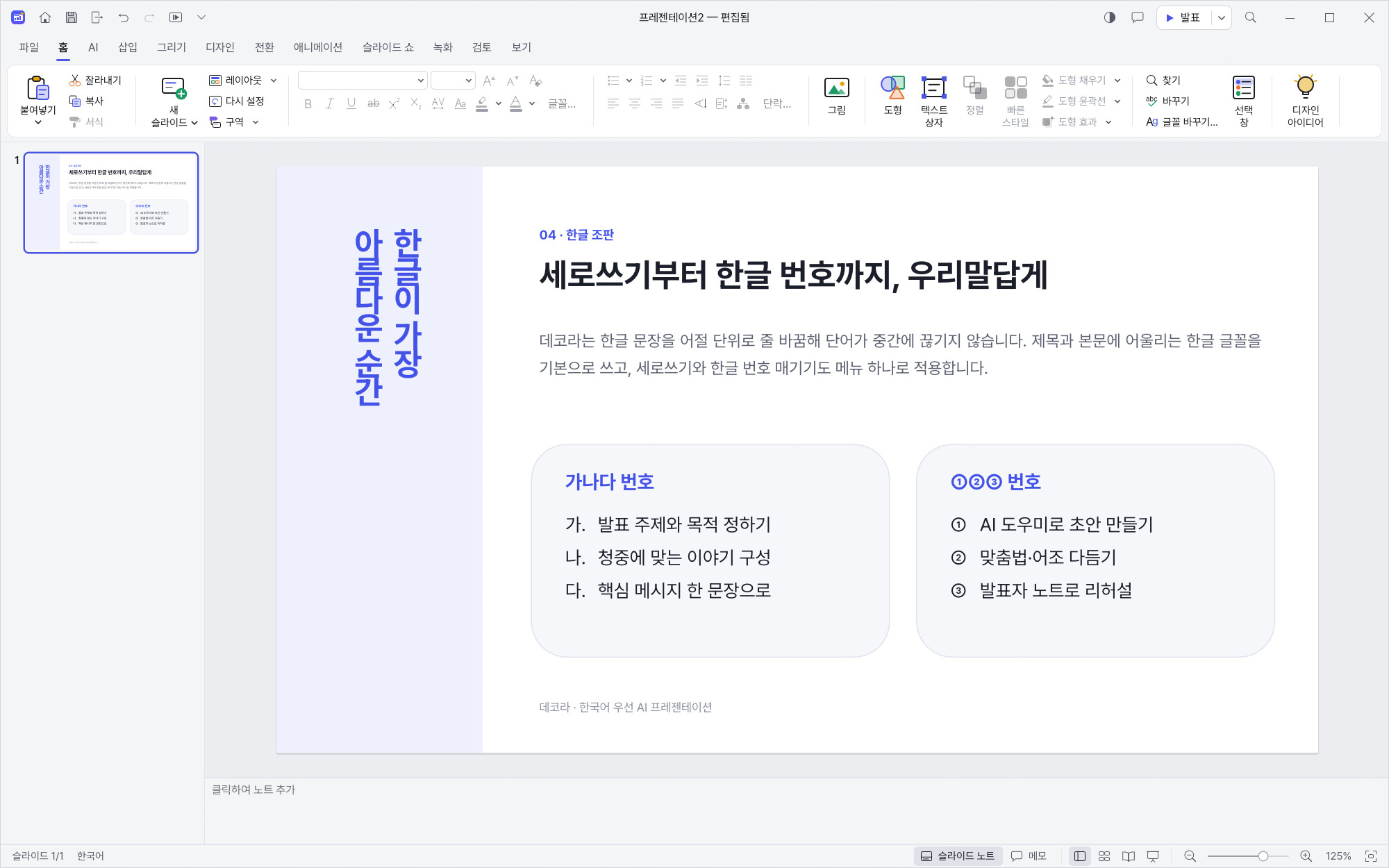
Vertical text, Korean numbering (가. 나. 다. / ①②③)
📅
Korean date formats, centimeters as the default unit
Korean typesetting — vertical text, Korean numbering, word-unit line breaking
02 · AI

AI assistant (Ctrl+J)

✨
Create a deck from a topic
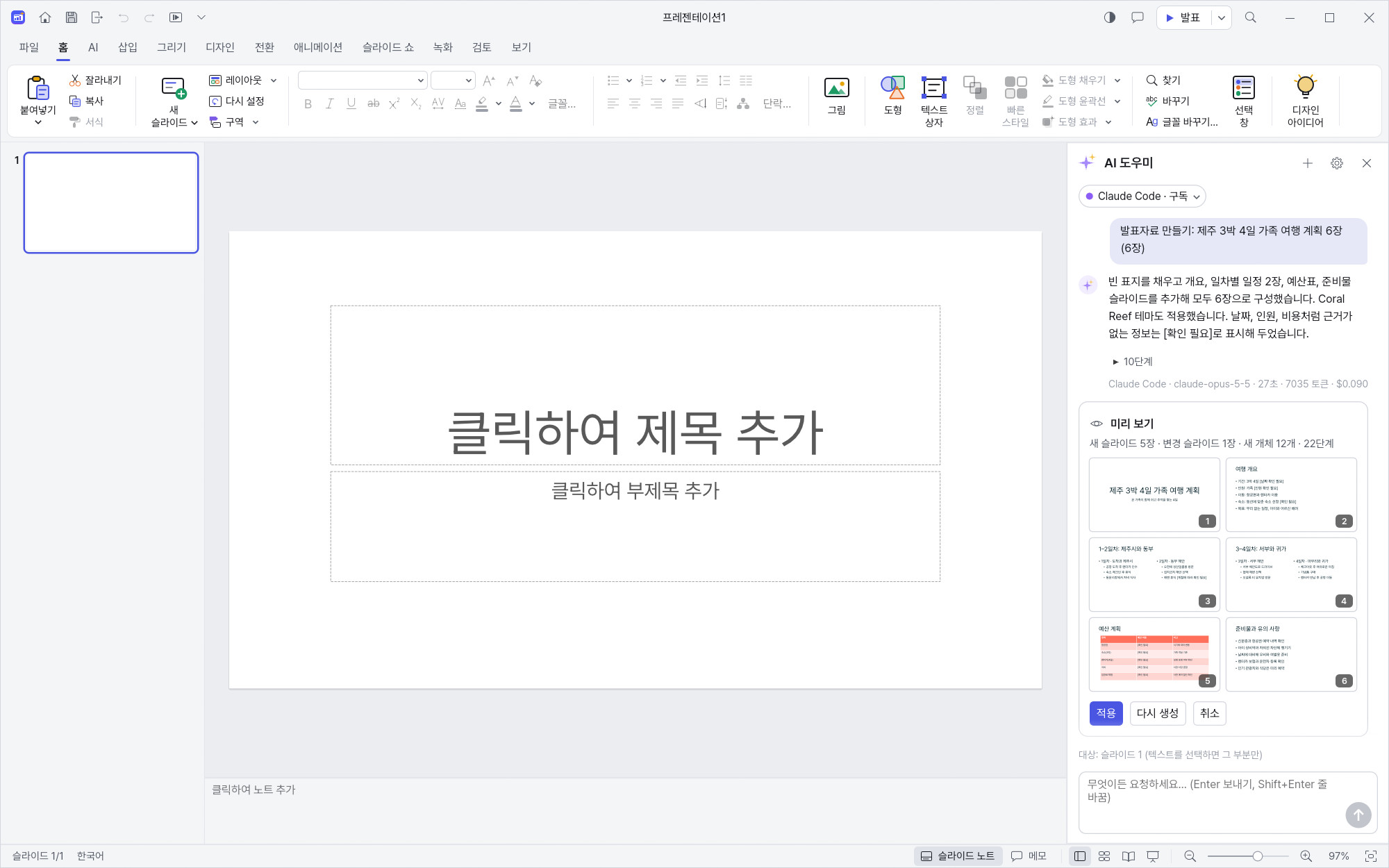
enter a topic and get a slide outline and draft content in one go
✍️
Work with text
polish · summarize · expand · translate · fix spelling
🎤
Get ready to present
write speaker notes, check consistency across the whole deck
📊
Visuals
create tables and charts, get design suggestions, write alt text for images
🛡️
Apply with confidence
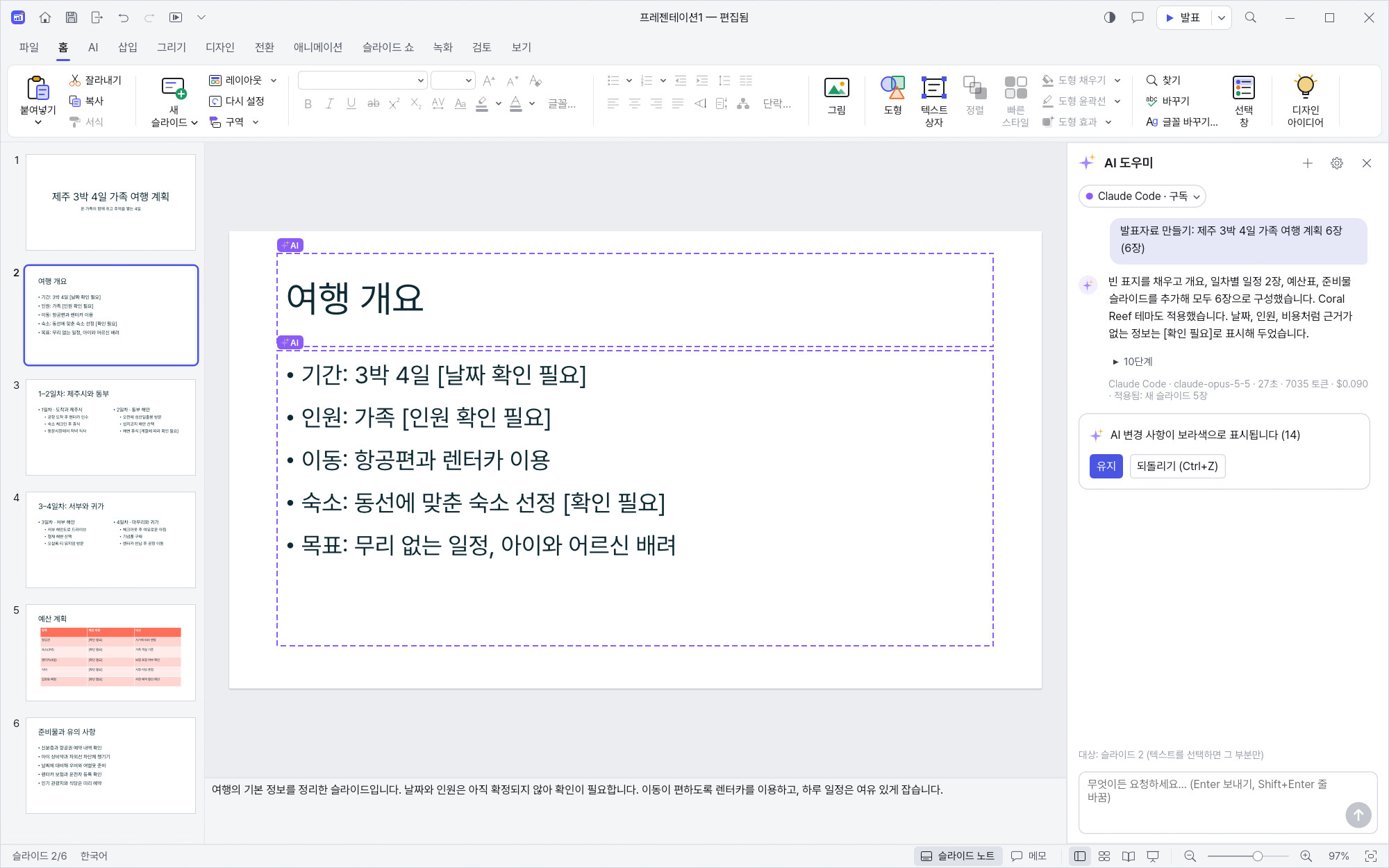
preview before applying, undo it all in one step, and see AI changes highlighted in purple
Create a deck with the AI assistant — press Ctrl+J, enter a topic, get a draft deck
AI preview & apply — check the result before applying; changes in purple, one-step undo
03 · CONNECT

Use the AI you already have

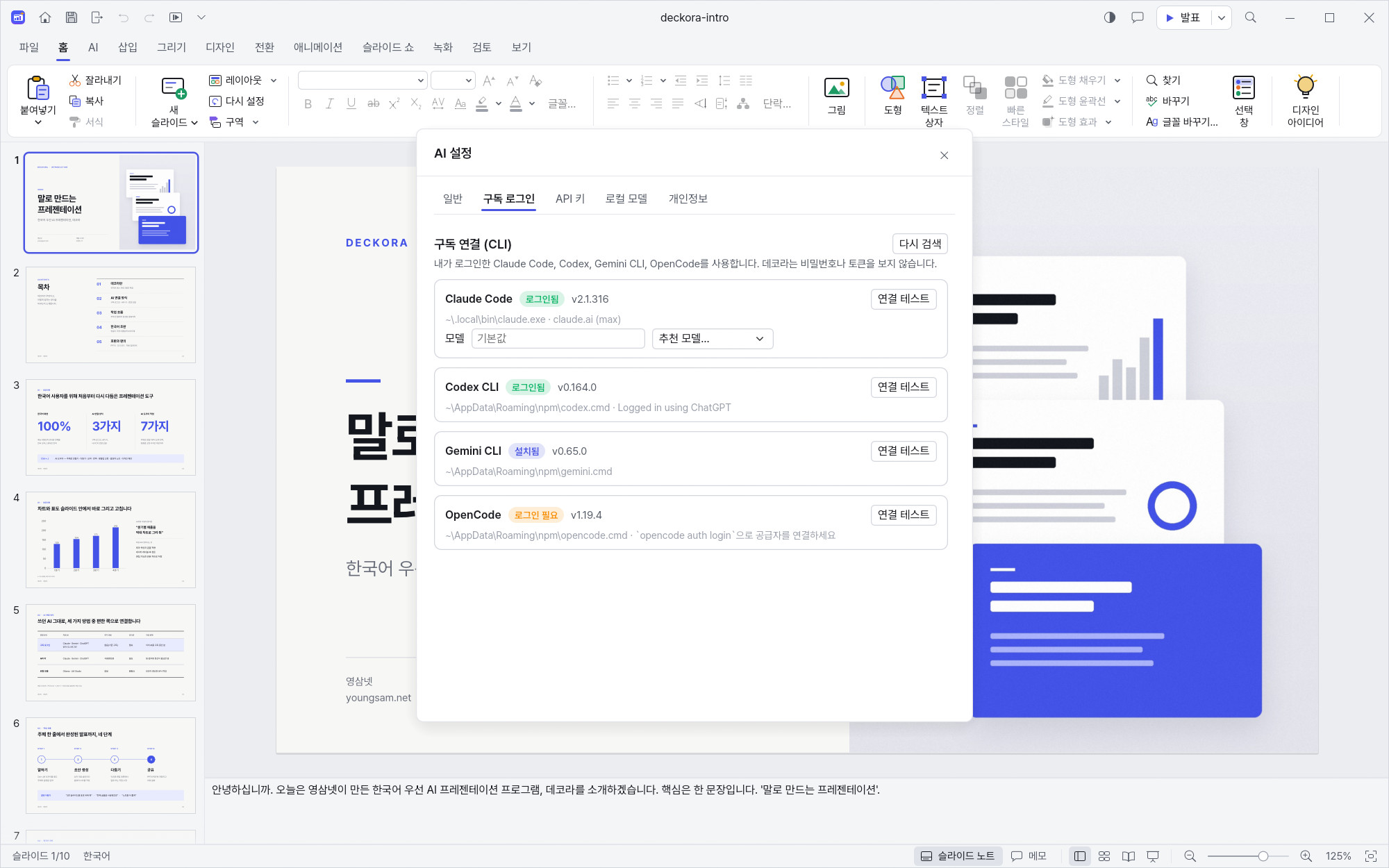
Subscription sign-inClaude Code, Gemini CLI, Codex (ChatGPT), OpenCode — sign in once in the official app and use the subscription you already pay for
API keyClaude, OpenAI, Gemini, OpenAI-compatible services — keys are stored in Windows Credential Manager
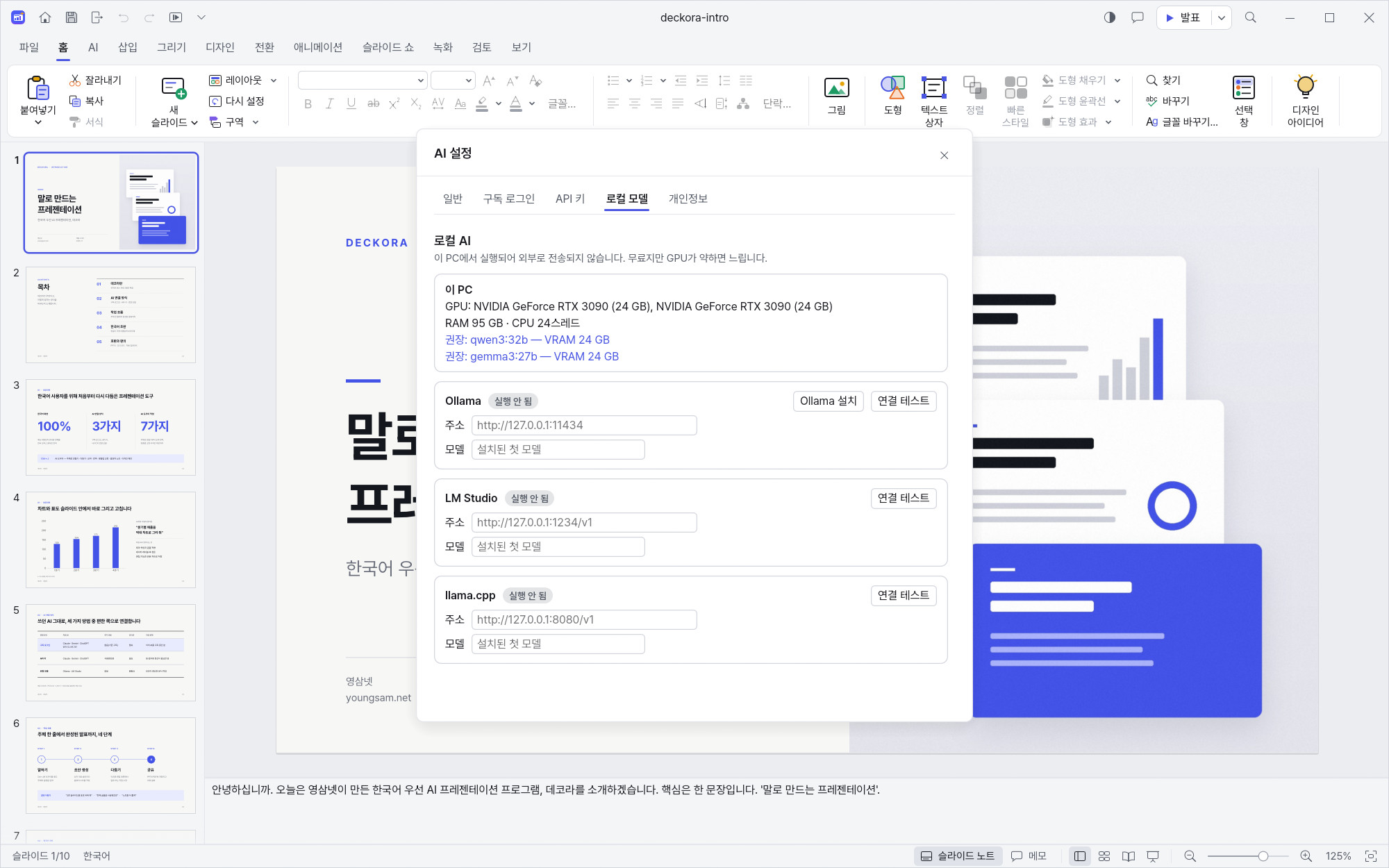
Local modelsOllama, LM Studio, llama.cpp — detects your GPU and recommends a suitable model; your data never leaves your PC
AI settings — connect via subscription sign-in, API key, or local model
AI settings — local models (Ollama · LM Studio), recommendations matched to your PC
04 · FAMILIAR

Familiar to use, broadly compatible

📂
Open and save PPTX files, export to PDF
⌨️
More than 320 editing commands
🎬
Animations · transitions · slide show · presenter view
🗂️
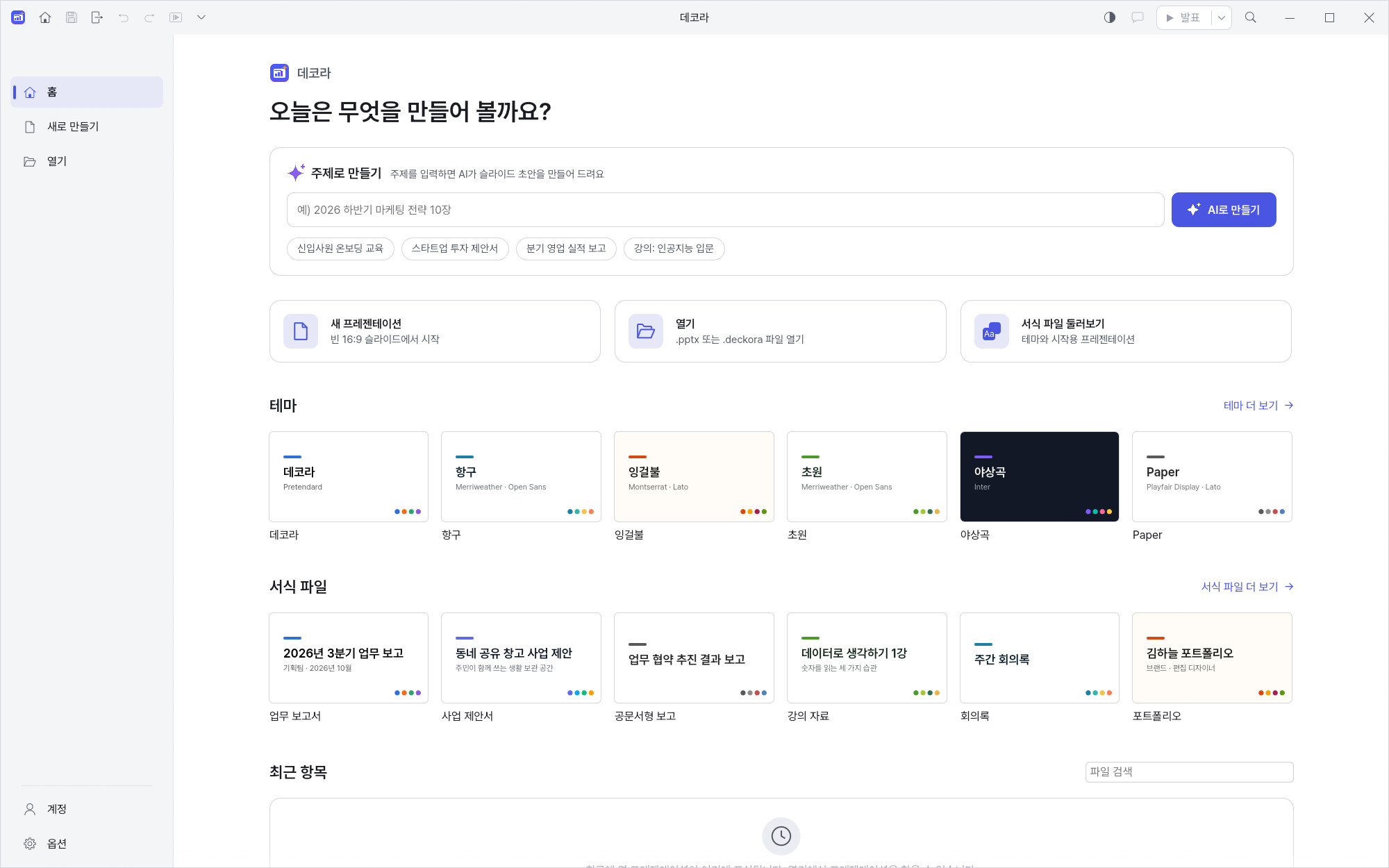
Start right away from Korean templates on the start screen
🌙
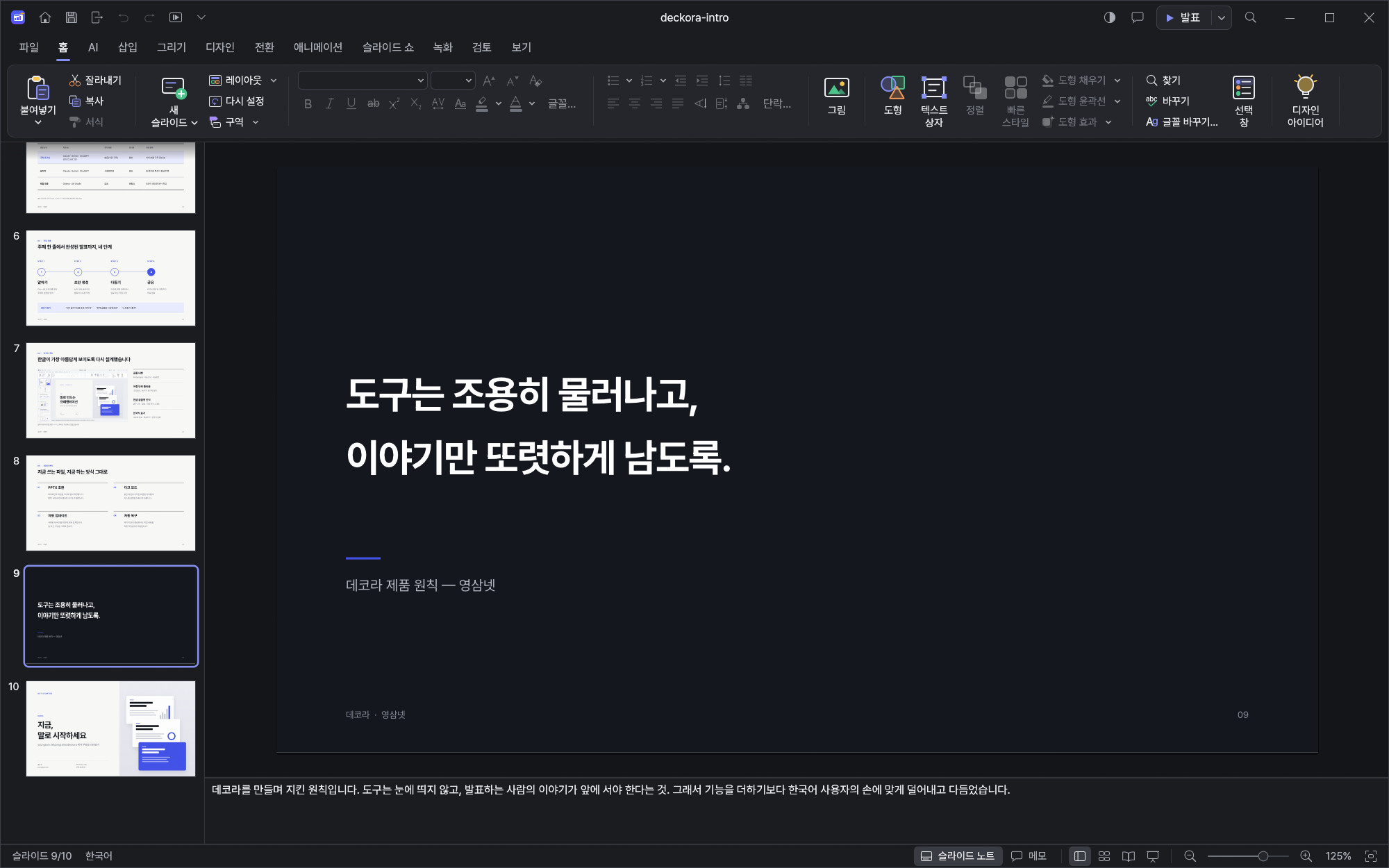
Dark mode
follows your Windows light/dark setting
Start screen — begin right away from Korean templates
Dark mode — follows your Windows light/dark setting
05 · SAFE

Comfortable and safe

🪟
Remembers window size and position for next time
🛟
Auto-recovery
brings back the deck you were working on after an unexpected shutdown
🔔
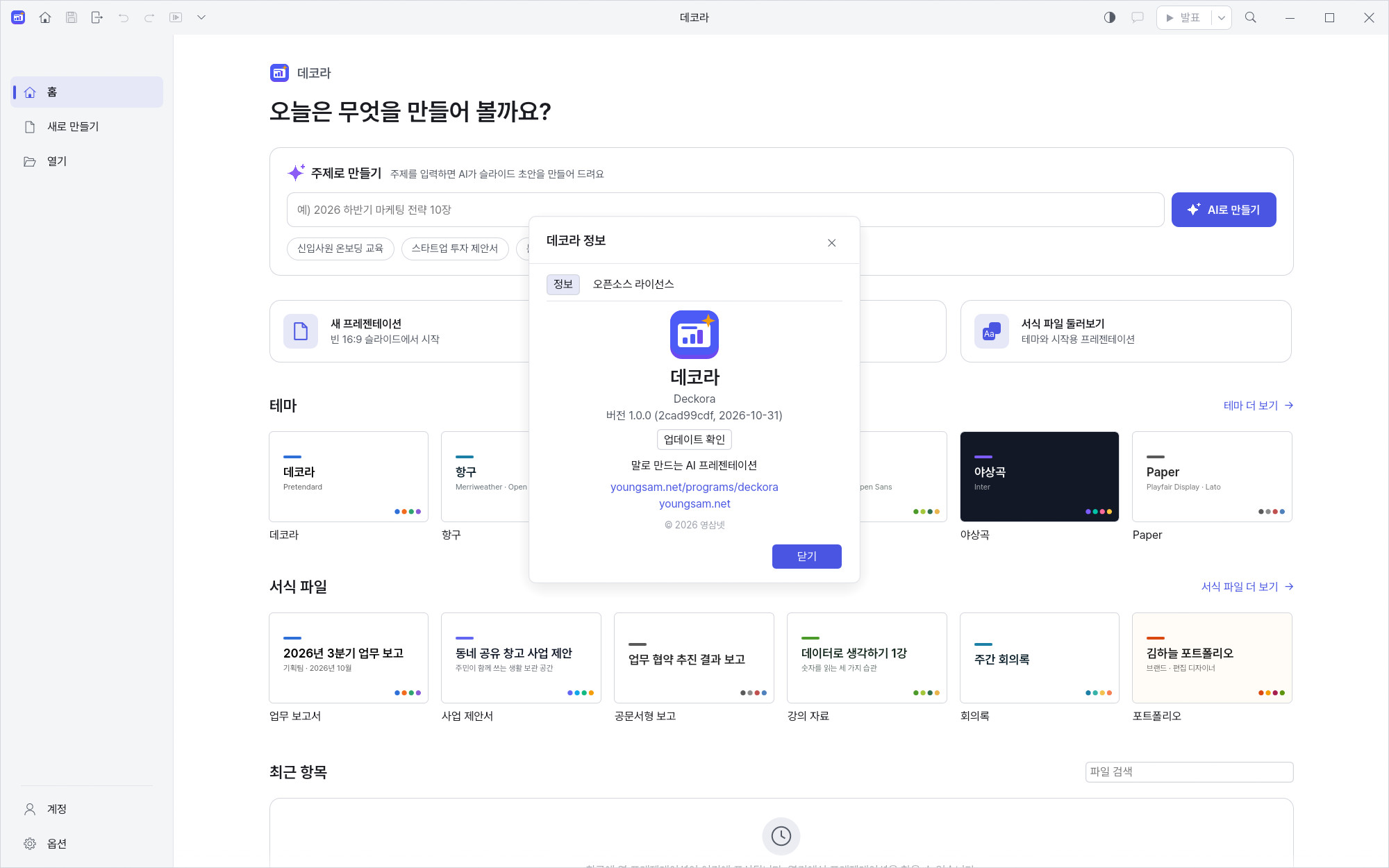
Update check
when a new version is out, it takes you straight to the download page
About & updates — Deckora 1.0.0 info and update check; new versions link to the download page
06 · INSTALL

How to install

1
Download and run the installer below (if Windows SmartScreen appears, click "More info → Run anyway")
2
Or unzip the portable version and run deckora.exe (the command-line tool deckora-cli.exe is included too)
no installation needed
3
To use AI: in AI settings, connect a subscription sign-in, an API key, or a local model
4
Open a deck and press Ctrl+J to open the AI assistant
07 · DOWNLOAD

Download (free)

InstallerRecommended
Deckora-1.0.0-windows-x64-setup.exe53.6 MB
✓Download and run to install
SHA-256
809c668ed992e6315cc831d6a51f6bbf7bbcb070ab844c15e2560a32e38b9c00
Portable (zip)No install
Deckora-1.0.0-windows-x64-portable.zip72.0 MB
✓Unzip and run
SHA-256
f3759471e65706879a4d134b5bf972409c4db766a814cb15357b89f54270dc11

You can also use the buttons in the download box above. Both are for Windows 10 / 11 64-bit.

# Verify the downloaded files (Windows PowerShell)
Get-FileHash .\Deckora-1.0.0-windows-x64-setup.exe -Algorithm SHA256
Get-FileHash .\Deckora-1.0.0-windows-x64-portable.zip -Algorithm SHA256

# Expected values
# Deckora-1.0.0-windows-x64-setup.exe
# 809C668ED992E6315CC831D6A51F6BBF7BBCB070AB844C15E2560A32E38B9C00
#
# Deckora-1.0.0-windows-x64-portable.zip
# F3759471E65706879A4D134B5BF972409C4DB766A814CB15357B89F54270DC11
Intro deck (PPTX) — a slide deck made with DeckoraPPTX
deckora-intro.pptx1.1 MB
✓The original Deckora intro deck
✓Open it in Deckora or any PPTX app
08 · FAQ

FAQ

Is it really free?

Yes, the app is free. For AI, connect a subscription or API key you already have, or a free local model. (API usage is billed by the AI provider.)

Can I use it without AI?

Yes. Opening and saving PPTX, editing and slide shows all work without an AI connection.

I don't want my content to leave my PC.

Connect a local model (Ollama, LM Studio, llama.cpp) and your data stays on your PC. Deckora checks your GPU and recommends a suitable model.

What if I don't like what the AI changed?

AI results are shown as a preview first, and even after applying you can undo everything in one step. Changes are highlighted in purple.

Can it open my existing PPTX files?

Yes. Open a PPTX, edit it, then save it back as PPTX or export to PDF.

Does it run on Mac?

Currently Windows 10/11 (64-bit) only.

Version history(1)
v1.0.0Latest
November 1, 2026
■ 1.0.0 · 데코라 첫 출시 — 한국어 우선 AI 프레젠테이션 프로그램 · AI 도우미(Ctrl+J): 주제로 발표자료 만들기, 다듬기·요약·늘리기·번역, 맞춤법 교정 · 발표자 노트, 일관성 검사, 표·차트 만들기, 디자인 제안, 대체 텍스트 · 미리보기 후 적용, 한 번에 되돌리기, AI 변경 부분 보라색 표시 · AI 연결: 구독 로그인 · API 키 · 로컬 모델(GPU 감지 후 추천) · 한국어 조판: 어절 단위 줄 바꿈, 한글 글꼴 매칭·한국어 글꼴 이름 표시, 세로쓰기, 가나다·(가)·ㄱ·①②③ 자동 번호, 한국식 날짜, cm 단위 · PPTX 열기·저장, PDF 내보내기, 320개 이상 편집 명령(명령 검색 한글 입력) · 단어 단위 실행 취소, Ctrl+M 새 슬라이드 · 애니메이션·전환·슬라이드 쇼(전체 화면)·발표자 보기 · 다크 모드, 창 크기·위치 기억, 자동 복구·복구 안내, 업데이트 확인 메뉴 · 파일 형식별 아이콘 · 설치판과 무설치판(zip) 제공
Questions or bug reports?
Ask in our community — English is fine. Reviews and Q&A are collected on the Korean page.