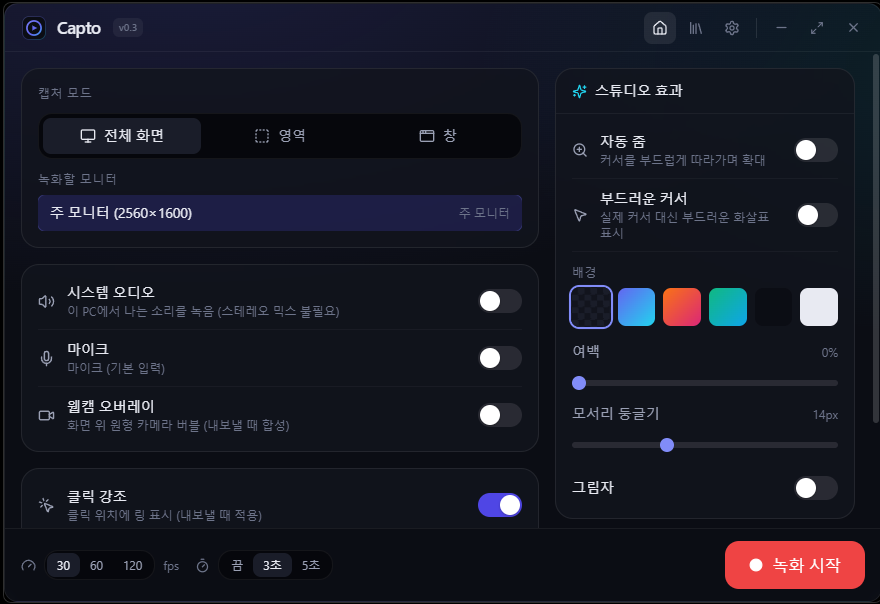
Capto — just hit record, and your video makes itself beautiful
Capto is a free Windows screen recorder where "you just hit record and get a polished demo video" automatically.
Enjoy the automatic zoom and smooth-cursor feel of Mac-only Screen Studio, now on Windows and for free.
High-performance GPU capture like Bandicam comes standard. No watermark · portable version available · every feature free.
▶ Why Capto (once you use it, there's no going back)
· Just record. Capto makes it look good.
While you record, it quietly logs your mouse path, clicks and key presses. Then on export, it automatically adds:
- "Automatic zoom" that smoothly follows and magnifies the cursor
- A "click highlight" ring that ripples out where you clicked
- A "smooth cursor" that glides instead of the real pointer
- "Keystroke display" that shows the shortcuts you pressed on screen
Even a rough take looks like a product demo.
· On Windows, for free.
The core of Screen Studio (Mac-only, $89+) on Windows for free. No watermark, no locked features.
· A beautiful background in one step.
Gradient/solid backgrounds, padding, rounded corners, shadows — one export gives you the "studio look."
▶ Fast and lightweight (let us brag about performance a little)
· Direct GPU capture
Captures the screen straight from the GPU with DXGI Desktop Duplication (ddagrab) for smooth, drop-free recording.
On unsupported setups it automatically falls back to GDI — it records anywhere.
· Automatic hardware encoder detection
It automatically finds NVIDIA NVENC · Intel QSV · AMD AMF and encodes without loading your CPU (libx264 if none is available).
· Launches the moment you open it
We stripped out unnecessary network fonts/runtimes to cut cold-start time.
· Exported video plays right away
MP4 gets +faststart so the index sits up front, letting upload and playback start with no wait.
· The library is instant too
Thumbnails of past recordings are generated once and cached — after that they appear right away.
▶ Key features
· Capture area: full screen / drag a region / a specific window
· Audio: system sound (loopback) + mic recorded simultaneously — no "Stereo Mix" setup needed
· Webcam bubble: circular camera overlay on screen (composited on export)
· Studio effects: automatic zoom · smooth cursor · click highlight · keystroke display · background/padding/rounded corners/shadow
· Editor: click the video or timeline to play/seek, trim (cut), speed 0.5-2x, resolution (original·1080p·720p), keyboard shortcuts, click·key markers, time tooltip
· Output formats: MP4 (H.264) · high-quality GIF (2-pass palette) · WebM (VP9) — with progress display
· Library: browse recent recordings (grid/list), delete single·selected·all at once (moved to Recycle Bin)
· Extras: screenshot, countdown, global shortcuts (fully customizable)
· Styling: 7 themes (including light), multilingual (Korean · English · Japanese)
▶ What it's built with
· Shell: Tauri 2 (Rust backend + webview UI) — a light, fast native app
· Capture/encoding: bundled ffmpeg (no separate install) — ddagrab/gdigrab, libx264 + NVENC/QSV/AMF, 2-pass GIF palette
· Audio: WASAPI loopback + mic
· System: the windows crate for monitor/window enumeration and native capture
▶ Install / Download
· Installer: Capto_0.3.0_x64-setup.exe
Double-click → follow the prompts to install. It registers in the Start menu.
· Portable: Capto-0.3.0-portable.zip
Unzip and run capto.exe — that's it. ffmpeg is included, so there's no separate install.
· System requirements
Windows 10 / 11 (64-bit), WebView2 runtime (already installed on most machines).
※ Because ffmpeg is bundled, the download size is on the large side — in exchange, there's nothing extra to install.
▶ Key shortcuts (defaults · changeable in settings)
· Start / stop recording: Ctrl + Alt + R
· Pause / resume: Ctrl + Alt + P
· Screenshot: Ctrl + Alt + S
· Select region: Ctrl + Alt + A
· Editor play/stop: Space | jump 5s: ← / → | to trim ends: Home / End
▶ Frequently Asked Questions (FAQ)
Q. Is it really free?
A. Yes. No watermark, no locked features. Every feature is free with no limits.
Q. Do I have to install it?
A. No. Unzip the portable zip and run capto.exe directly.
Q. Do I need to install ffmpeg separately?
A. No. It's bundled in the app and works as-is.
Q. Will system audio record even without "Stereo Mix"?
A. Yes. It uses WASAPI loopback, so no separate device setup is needed.
Q. How do I turn on automatic zoom and click effects?
A. Turn them on under "Studio effects" on the home screen or in the editor; they're applied on export.
Q. Does it work on Mac/Linux?
A. It's Windows-only for now.